
Vivify Realtime AI Face Swap
VerifiedVivify Realtime AI Face Swap is a live webcam face-swap tool aimed at streamers, gamers, and video call users. It regenerates a live camera feed using a chosen reference face while tracking the user's expressions, head movement, and pose in real time. It runs as a browser-based live preview studio, and also offers a downloadable Vivify Live Client for Windows and macOS that creates a virtual camera usable in apps like OBS, Zoom, Microsoft Teams, Google Meet, and Discord. Beyond face swap, it includes Live Try-On and Restyle modes for outfit and style transformation. New users get a limited free preview, with paid credit-based plans afterward for continued use.
Vivify Realtime AI Face Swap at a glance
- What it is
- Vivify Realtime AI Face Swap is a live webcam face-swap tool aimed at streamers, gamers, and video call users.
- Who it's for
- Worth a look if projects involving Face Swap & Deepfake Tools come up often in your week.
- Primary use case
- Vivify's Realtime AI Face Swap regenerates your live webcam view with a reference face you pick.
- CategoryFace Swap & Deepfake Tools
- PricingFree Tier
- Starting price$12/month (billed quarterly at $31.68, Basic plan)
- Credit cardNo credit card required
- Bring your own keyNot supported
- RatingNo reviews yet. Be the first to rate.
Video Spot
Overview
Vivify Realtime AI Face Swap is a live webcam face-swap tool aimed at streamers, gamers, and video call users. It regenerates a live camera feed using a chosen reference face while tracking the user's expressions, head movement, and pose in real time. It runs as a browser-based live preview studio, and also offers a downloadable Vivify Live Client for Windows and macOS that creates a virtual camera usable in apps like OBS, Zoom, Microsoft Teams, Google Meet, and Discord. Beyond face swap, it includes Live Try-On and Restyle modes for outfit and style transformation. New users get a limited free preview, with paid credit-based plans afterward for continued use.
Vivify's Realtime AI Face Swap regenerates your live webcam view with a reference face you pick. It follows your expressions, head turns and pose as you move. It runs in the browser, and the Vivify Live Client for Windows 10/11 and macOS 13+ (Apple Silicon) adds a "Vivify Camera" virtual camera for OBS, Zoom, Teams, Meet and Discord. Vivify also includes Live Try-On and Restyle. New users get 88 free seconds after signup, then pay per second. From $12/mo.
In detail
Vivify's Realtime AI Face Swap is a live, webcam-based face-swapping tool. Instead of overlaying an image on top of a video, it continuously regenerates the user's camera view using a selected reference face, following the person's expressions, head position, and movement as they happen. The tool also supports Live Try-On, which applies outfit references to a live feed, and Live Restyle, which applies visual style references to transform the look of a live person feed.
The tool is built for streamers, gamers, and people on video calls who want a transformed on-camera appearance in real time. It works directly in the browser for a live preview, letting users upload or choose a reference face, start a session, and compare the AI output against their original camera feed. For deeper integration, Vivify offers a downloadable Live Client for Windows 10/11 and macOS 13+ (Apple Silicon) that turns the transformed feed into a virtual camera, which can then be selected as the camera source in OBS for streaming to platforms like Twitch, YouTube Live, or TikTok LIVE, or in meeting apps like Zoom, Microsoft Teams, Google Meet, and Discord.
Technically, the system separates the motion source from the look source: the live camera supplies movement, expressions, and pose, while the uploaded reference image supplies the face, outfit, or style to apply. The AI recreates the camera view frame by frame with this combined input rather than compositing a static overlay, which is intended to keep framing and expressions readable during use.
What differentiates this offering from a typical face swap app is the virtual camera integration, which lets the effect be used inside third-party streaming and meeting software rather than being confined to a single app's interface. Vivify also offers multiple AI models (such as XMAX and Lucy) with different credit costs, giving users some choice in quality versus usage efficiency.
Access is credit-based: new users receive a limited number of free live preview seconds after signup, and continued use draws from a shared credit balance across Vivify's other tools (image and video generation), available through monthly or quarterly subscriptions or one-time credit packs that do not expire.
Common uses
- Streaming on Twitch, YouTube Live, or TikTok LIVE with a transformed on-camera appearance
- Appearing as a different face or character during video calls in Zoom, Teams, Google Meet, or Discord
- Previewing live face swap results before committing to a recording or stream
- Trying on outfits live for creator or shopping-style workflows
- Applying a stylized or character look to a live camera feed for branded content
Pros
- Works as a virtual camera, so it integrates with existing streaming and meeting software rather than being a standalone app
- Free trial seconds let users test the live preview before paying
- Includes Try-On and Restyle modes in addition to face swap
- Multiple AI models let users balance quality against credit cost
- Credits are shared across Vivify's broader image and video tools, giving added flexibility for subscribers
Cons
- Desktop client is limited to Windows 10/11 and macOS 13+, with no stated support for other platforms or mobile
- Usage beyond the free preview is billed per second from a credit balance, which can add cost for longer sessions
- No free ongoing tier; continued use requires a paid plan or credit pack
- Pricing structure (shared credits across multiple tools) may be harder to predict than a flat per-use price for this feature alone
Generated from the listing's details and not yet checked by a Zoipi editor.
Key Features
- Live browser preview: swap a reference face into your webcam feed and compare it with the original in real time
- Vivify Live Client: downloadable app for Windows 10/11 and macOS 13+ that creates a virtual camera
- Virtual camera integration: use the transformed feed in OBS, Zoom, Microsoft Teams, Google Meet, and Discord
- Live Try-On mode: apply outfit references to a live camera feed
- Live Restyle mode: apply visual style references to transform the look of a live feed
- Multiple AI models: choose between options like XMAX and Lucy with different credit costs
- Shared credit system: credits apply across live face swap, image generation, and video generation tools
Best For
- People who spend real hours each week on face swap & deepfake tools
- Anyone testing the space without an upfront budget
Pricing Model
Free Tier. Generous ongoing free tier you can start with, no credit card needed. Paid plans unlock higher limits.
Pricing Breakdown
Screenshots
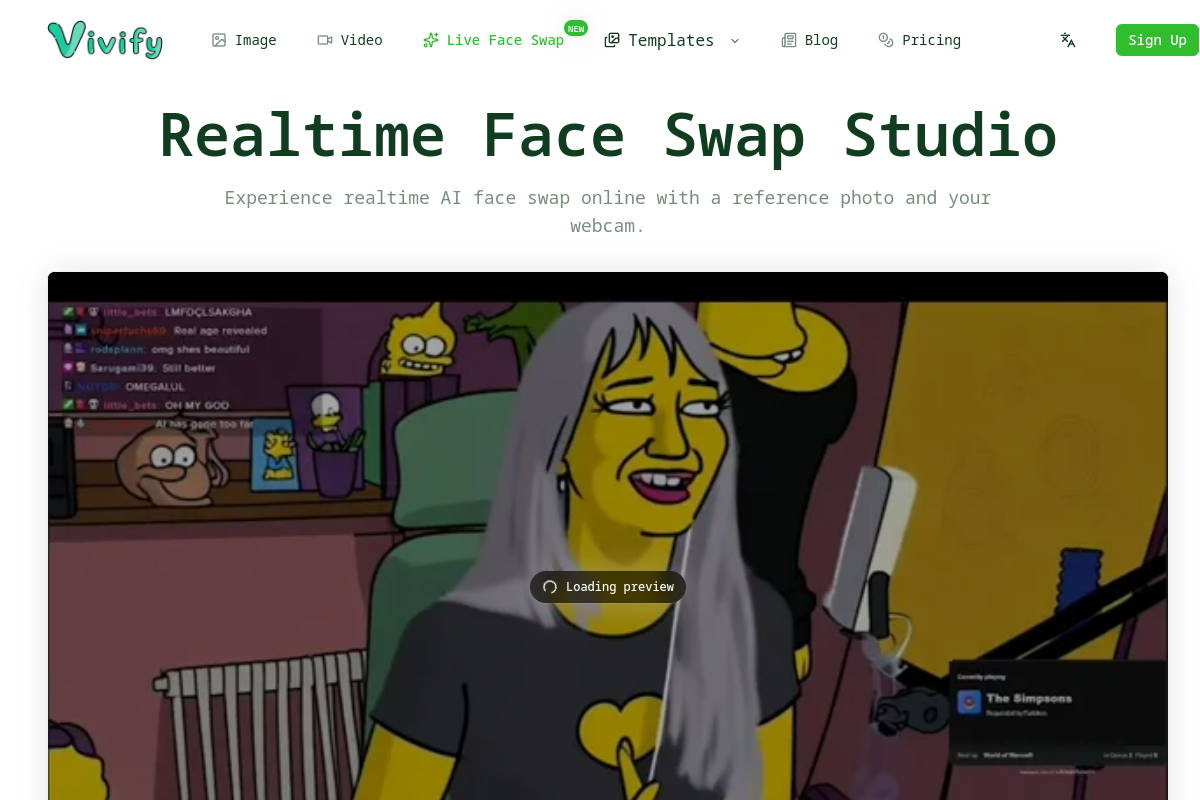
Live preview of Vivify Realtime AI Face Swap's website.
Frequently asked questions
Community Reviews & Discussion
0 reviews · replies are moderated before they appear.
- No reviews yet — be the first to review Vivify Realtime AI Face Swap.