Reference to Video
VerifiedReference to Video is a web-based AI video generator that turns a reference clip combined with your own photos into a new video. Users pick a template or upload a 2-15 second clip, add up to 9 photos, and the tool recreates the clip's motion, camera movement, and timing with the new subject. It offers selectable AI models (Seedance 2.0, Fast, or Mini variants), adjustable resolution, length, and audio settings, plus a custom prompt field for specifying scene details. A workspace keeps references and generated outputs together for review and iteration. It suits creators, marketers, and hobbyists who want to recreate a specific movement, camera move, or performance using their own subjects, such as fashion looks, product reveals, or character recreations, without needing to describe motion purely in text.
Reference to Video at a glance
- What it is
- Reference to Video is a web-based AI video generator that turns a reference clip combined with your own photos into a new video.
- Who it's for
- Aimed at makers and small teams exploring the Text-to-Video category.
- Primary use case
- Reference to Video uses a reference clip for the motion and your photos for the subject.
- CategoryAI Video Generators
- PricingFree Tier
- Starting price$8.33/month
- Credit cardNo credit card required
- Bring your own keyNot supported
- RatingNo reviews yet. Be the first to rate.
Video Spot
Overview
Reference to Video is a web-based AI video generator that turns a reference clip combined with your own photos into a new video. Users pick a template or upload a 2-15 second clip, add up to 9 photos, and the tool recreates the clip's motion, camera movement, and timing with the new subject. It offers selectable AI models (Seedance 2.0, Fast, or Mini variants), adjustable resolution, length, and audio settings, plus a custom prompt field for specifying scene details. A workspace keeps references and generated outputs together for review and iteration. It suits creators, marketers, and hobbyists who want to recreate a specific movement, camera move, or performance using their own subjects, such as fashion looks, product reveals, or character recreations, without needing to describe motion purely in text.
Reference to Video uses a reference clip for the motion and your photos for the subject. Pick a template or upload a 2 to 15 second clip, add up to 9 photos, and generate a new video that follows the original action. Freemium, with free credits at login.
In detail
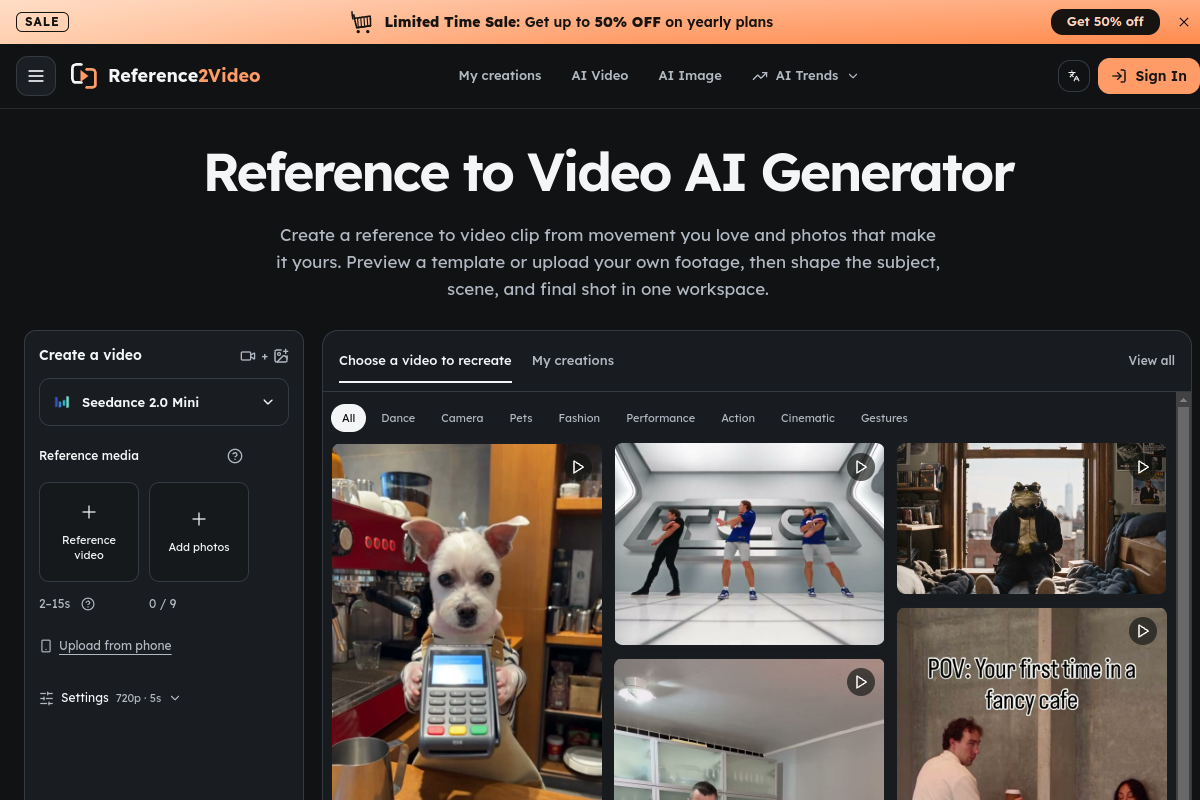
Reference to Video is an AI video generator built around the idea of starting from motion you can show rather than describe. Instead of writing a long text prompt to explain camera movement, pacing, and gesture, users supply a reference clip between 2 and 15 seconds long, which communicates the action, camera movement, and timing, and pair it with up to 9 of their own photos that introduce the subject and visual details for the new version.
The tool is aimed at creators working on fashion and character performances, product reveal or unboxing videos, and short social-style edits who want to reuse a proven movement pattern with a new subject. A library of templates covers fashion walks, product reveals, camera moves, dance and performance clips, and more, or users can upload their own footage instead of choosing from the library.
The workflow runs in three steps: first choose the motion (template or uploaded clip) and add clear photos of the subject; second, select a model (Seedance 2.0, Seedance 2.0 Fast, or a Genjutsu/Mini option) and adjust resolution, length, audio, and aspect, plus an optional text prompt for extra control; third, generate the clip, track progress in “My creations,” review the result for movement, faces, hands, and transitions, and download the version you want. A credit estimate updates as settings change so users can see cost before generating.
What differentiates Reference to Video is this reference-plus-photos approach rather than pure text-to-video generation, since it lets users specify exact motion, camera paths, and timing that are hard to put into words, while still allowing prompt text for finer control over subject and scene changes. The workspace keeps reference inputs and generated results together, making it easier to compare attempts and refine one setting at a time.
The product is freemium: new users get free credits at login (10 free credits, with additional credits available via a weekly check-in), and paid plans (Starter, Pro, and Business, billed monthly or yearly) unlock larger credit allowances for more images and videos across the supported models.
Common uses
- Recreating a fashion or streetwear walk sequence with your own outfit or look
- Turning a product unboxing or orbit shot into a new promotional clip for a different product
- Reproducing a specific camera move or performance for character or persona content
- Exploring a visual direction before committing to a longer, fully produced edit
- Making short social media style videos by recreating trending movement templates
Pros
- Lets users specify exact motion and camera movement via a reference clip instead of relying only on text prompts
- Template library covers a wide range of styles, from fashion to product reveals to performances
- Multiple AI model options with adjustable resolution, length, and audio settings
- Credit cost estimate shown before generation helps avoid surprises
- Free credits available at login plus ongoing credits via weekly check-in
Cons
- Credit-based system means heavier use requires a paid subscription or credit package
- Reference clips limited to 2-15 seconds, restricting longer source footage
- Results are AI reinterpretations, so outputs may not precisely match intended framing or detail and require review
- Commercial usage rights depend on model-specific terms rather than a blanket policy
Generated from the listing's details and not yet checked by a Zoipi editor.
Key Features
- Reference clip input: upload or choose a 2-15 second clip that defines motion, camera movement, and timing
- Multi-photo subject input: add up to 9 of your own photos to introduce the subject into the new video
- Template library: pre-built reference clips for fashion, product reveals, camera moves, and performances
- Selectable AI models: choose between Seedance 2.0, Seedance 2.0 Fast, and Mini/Genjutsu options
- Adjustable generation settings: resolution, length, audio on/off, and aspect ratio
- Custom prompt option: describe specific subjects or scene changes alongside the reference
- Credit estimate before generating: see cost based on chosen settings before submitting
- Workspace history: references and generated results kept together under 'My creations' for review and iteration
Best For
- People who want to spend less time on repetitive steps
- Creators exploring Text-to-Video
- Anyone testing the space without an upfront budget
Pricing Model
Free Tier. Generous ongoing free tier you can start with, no credit card needed. Paid plans unlock higher limits.
Pricing Breakdown
Screenshots
Live preview of Reference to Video's website.
Frequently asked questions
Community Reviews & Discussion
0 reviews · replies are moderated before they appear.
- No reviews yet — be the first to review Reference to Video.