Motion Transfer
VerifiedMotion Transfer is a web-based AI video tool that animates a character photo using the motion from a reference video or a pre-made trend template. Users upload a photo of a person, pet, or character, pair it with a reference clip or template showing dances, gestures, or performances, and generate a new video that combines the photo's appearance with the reference's movement. It offers a library of trend templates, adjustable settings like resolution, length, and model choice, and a workspace to preview and download results. It suits content creators who want to produce trend-based videos quickly without writing prompts or configuring detailed motion parameters, while keeping a consistent character across posts.
Motion Transfer at a glance
- What it is
- Motion Transfer is a web-based AI video tool that animates a character photo using the motion from a reference video or a pre-made trend template.
- Who it's for
- Worth a look if projects involving Avatars come up often in your week.
- Primary use case
- Motion Transfer turns trending AI video effects into templates.
- CategoryAI Video Generators
- PricingFree Tier
- Starting price$8.33/month
- Credit cardNo credit card required
- Bring your own keyNot supported
- RatingNo reviews yet. Be the first to rate.
Video Spot
Overview
Motion Transfer is a web-based AI video tool that animates a character photo using the motion from a reference video or a pre-made trend template. Users upload a photo of a person, pet, or character, pair it with a reference clip or template showing dances, gestures, or performances, and generate a new video that combines the photo's appearance with the reference's movement. It offers a library of trend templates, adjustable settings like resolution, length, and model choice, and a workspace to preview and download results. It suits content creators who want to produce trend-based videos quickly without writing prompts or configuring detailed motion parameters, while keeping a consistent character across posts.
Motion Transfer turns trending AI video effects into templates. Choose a trend, upload a photo of a person, pet, or character, and it generates the clip. No reference video, written prompt, or model settings. Made for creators who want to join a trend quickly and keep one character across posts.
In detail
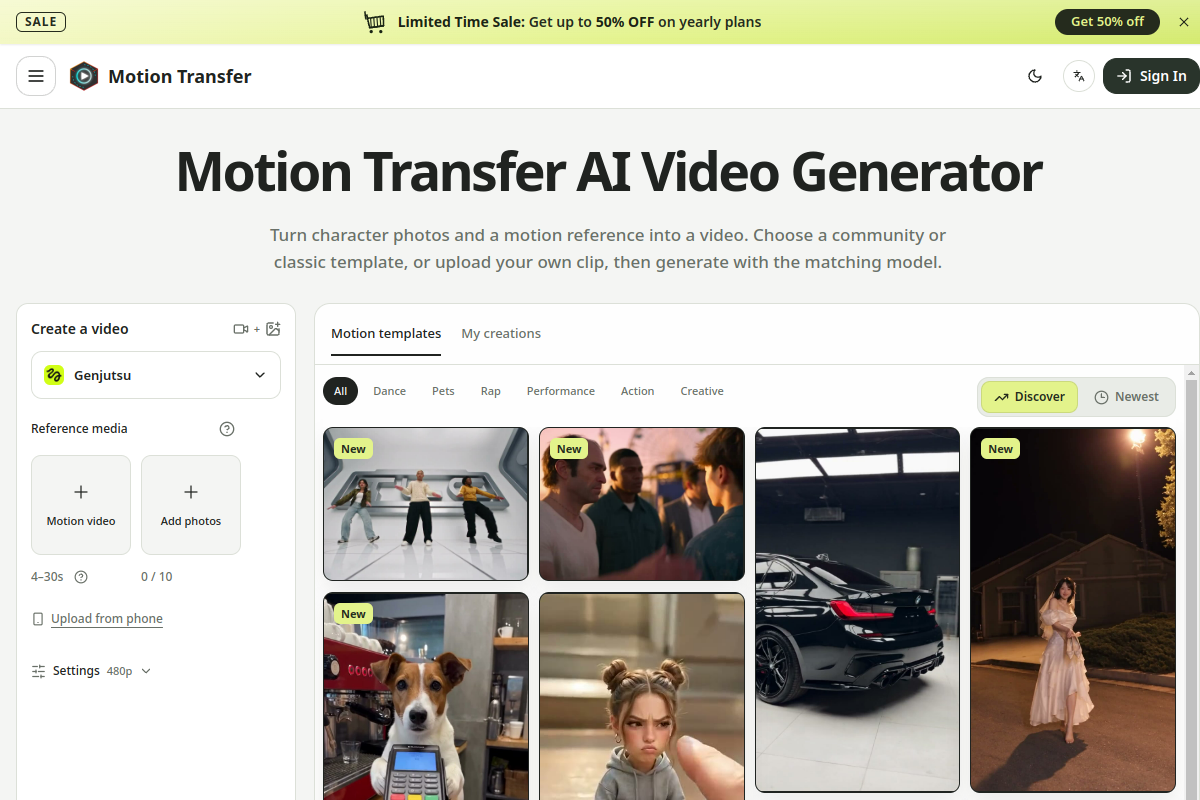
Motion Transfer is an AI video generation tool that lets users animate a photo of a person, pet, or character using the motion from a separate reference video or a ready-made trend template. The photo supplies the appearance, while the reference clip or template supplies the movement, gestures, and expressions. The result is a new video combining both, which users can preview and download from an in-browser workspace.
The tool is aimed at content creators who want to join trending video formats, such as dances, pet videos, rap performances, and other viral templates, without needing to film the action themselves or write descriptive text prompts. Because templates come with built-in motion and often built-in prompts, users can generate a clip by simply uploading a photo and picking a trend, though a custom prompt option exists for more control with supported models.
Technically, the workspace supports several models, including Kling 2.6 and 3.0 Motion Control, Wan 2.2 Animate Move and Replace, and Seedance 2.0 and 2.5, each with different supported resolutions, reference video lengths, and file formats. Settings like Match photo or Match video (for Kling) determine whether the final character orientation follows the uploaded photo or the reference video. Users choose a model, resolution, and length, generate the clip, then review it in a history area called My creations before downloading.
What differentiates Motion Transfer is its focus on showing rather than describing motion: instead of writing out a gesture or dance sequence in a text prompt, users supply a reference clip or choose from a large catalog of prepared trend templates covering dances, pet videos, rap scenes, performances, and product reveal scenes. Some templates, like the Bullet Time Product Reveal, follow fixed prepared scenes (camera, timing, audio) where users only supply certain photos, limiting customization but simplifying the process.
The tool uses a shared credit system across images, videos, and motion transfer, with free starting credits and weekly credit rewards. It requires users to have rights to use any likeness or source media submitted. Outputs are not guaranteed to perfectly preserve facial details, clothing, or backgrounds, since the generation process can shift these elements as the character moves.
Common uses
- Recreating a trending dance or performance using your own photo
- Animating a pet photo with pre-made pet-specific motion templates
- Producing a product reveal video using a person photo and optional product photos
- Transferring a specific gesture (like a wave) from a reference clip onto a character photo
- Creating consistent-character trend videos for social media content
- Testing different models and settings to match a desired movement style
Pros
- Does not require writing a text prompt to generate motion-based videos
- Large library of ready-made trend templates across dances, pets, rap, and performances
- Supports multiple underlying models with different resolution and length options
- Free starting credits and weekly credit rewards let new users try the tool before paying
- Generation history lets users revisit and re-download past results
Cons
- Watermark-free downloads require a paid plan; the free tier only offers watermarked previews
- Facial details, clothing, and backgrounds can shift unpredictably during generation
- Some templates, like Bullet Time Product Reveal, use fixed prepared scenes with no prompt customization
- Credits are shared across images and videos and vary by model, length, and resolution, making cost somewhat unpredictable upfront
Generated from the listing's details and not yet checked by a Zoipi editor.
Key Features
- Photo plus reference animation: combine a character photo with a separate motion reference video to generate a new clip
- Trend template library: large catalog of pre-made dance, pet, rap, and performance templates with built-in motion
- Multiple model options: choose between Kling 2.6/3.0 Motion Control, Wan 2.2 Animate Move/Replace, and Seedance 2.0/2.5
- Match photo or Match video settings: control whether character orientation follows the uploaded photo or the reference video (Kling only)
- Adjustable resolution and length: settings vary by model, from 480p up to 1080p and clip lengths from a few seconds up to 30 seconds
- Optional custom prompt: edit or replace the built-in prompt text for supported models
- Generation history: review and re-download past results from My creations or account history
- Prepared scene templates: fixed scenes like Bullet Time Product Reveal that only require certain photo uploads, no prompt needed
Best For
- People who want to spend less time on repetitive steps
- Teams focused on Avatars
- Anyone testing the space without an upfront budget
Pricing Model
Free Tier. Generous ongoing free tier you can start with, no credit card needed. Paid plans unlock higher limits.
Pricing Breakdown
Screenshots
Live preview of Motion Transfer's website.
Frequently asked questions
Community Reviews & Discussion
0 reviews · replies are moderated before they appear.
- No reviews yet — be the first to review Motion Transfer.