Genjutsu AI
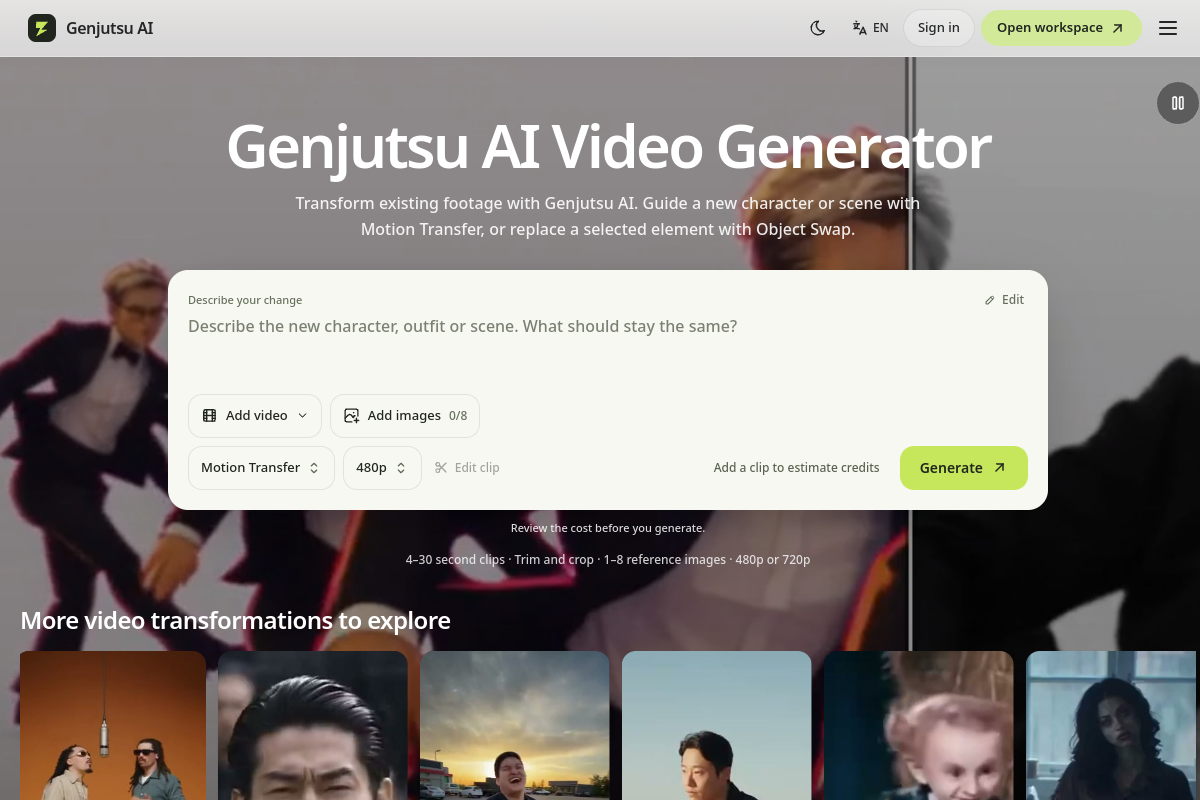
Genjutsu AI is an independent video-to-video workspace built on the Higgsfield Genjutsu model. It is for creators who already have a source clip and want to transform it rather than generate video from scratch. Users upload a 4-30 second video, trim and crop it, then add 1-8 reference images and a text description of the desired change. Motion Transfer uses the source clip's movement to guide a new character, setting or visual style, while Object Swap replaces a selected product, prop, outfit or character within the existing shot. Output is rendered in 480p or 720p, with a credit cost shown before generation and MP4 download after. Pricing runs on one-time credit packs rather than a subscription.
Zoipi note
Genjutsu AI is an independent website. It uses the Genjutsu name but is not made by or affiliated with Higgsfield.
Zoipi note
Not to be confused with Genjutsu AI (aigenjutsu.app). These are separate websites run by different people.
Genjutsu AI at a glance
- What it is
- Genjutsu AI is an independent video-to-video workspace built on the Higgsfield Genjutsu model.
- Who it's for
- Aimed at makers and small teams exploring the AI Video Editors category.
- Primary use case
- Upload a 4-30 second clip, trim and crop it, add 1-8 reference images and describe the change.
- CategoryAI Video Editors
- PricingFree Tier
- Starting priceFree, paid plans available
- Credit cardNo credit card required
- Bring your own keyNot supported
- RatingNo reviews yet. Be the first to rate.
Video Spot
Overview
Genjutsu AI is an independent video-to-video workspace built on the Higgsfield Genjutsu model. Upload a 4-30 second clip, trim and crop it, add 1-8 reference images and describe the change. Motion Transfer uses your clip's movement to guide a new character, scene or look; Object Swap replaces a selected product, prop, outfit or character in the shot. Choose 480p or 720p, review the credit quote before generating, then download MP4. One-time credit packs, no subscription.
In detail
Genjutsu AI is a video-to-video editing workspace built on the Higgsfield Genjutsu model, aimed at creators who want to transform footage they already have rather than generate clips from text alone. Since it requires a source video, it suits people reworking existing performances, product shots or scenes instead of starting from a blank prompt.
The workflow starts with uploading an MP4, MOV or WebM file up to 500 MiB, trimming it to 4-30 seconds and adjusting the crop. Users then add 1-8 reference images to define the look of a new character, object or scene, and write a prompt describing the intended change. Two modes are available: Motion Transfer, which uses the source clip's movement to guide a new character or setting, and Object Swap, which replaces a specific product, prop, outfit or character within the shot while trying to preserve the rest of the scene.
Before generating, users choose 480p or 720p resolution and see a credit quote based on clip length, since 480p costs 60 credits per second and 720p costs 130 credits per second, rounded up to the next whole second. Generation produces an MP4 that can be compared against the source clip and downloaded. The site states that exact motion, backgrounds, audio, lip sync and frame-perfect likeness are not guaranteed, so results need review before use.
What differentiates Genjutsu AI is its pricing model: one-time credit packs (Trial, Mini, Starter and Creator) rather than a subscription, with no auto-renewal and no credit expiry while the service remains active. Source clips are retained for 7 days and completed results for 30 days, so users need to download what they want to keep. The service is explicitly independent and not affiliated with Higgsfield, with accounts, billing and support handled separately.
Overall, it is a narrow, focused tool for two specific transformation types rather than a general-purpose video generator, built around transparent per-generation cost estimates and pay-as-you-go credits.
Common uses
- Reimagining a performance or scene with a new character using an existing video's motion
- Swapping a product, outfit or prop within a shot while keeping the surrounding scene
- Testing a visual concept on a short clip before committing to a longer production
- Creating variations of a video using different reference images
- Recreating trend-style video edits shown in the community example library
Pros
- No subscription; credits are bought once and do not expire while the service is active
- Shows a credit cost estimate before generation so users know the price upfront
- Supports two distinct transformation modes for different editing needs
- Private history with downloadable MP4 results
Cons
- Requires an existing source clip; it cannot generate video from text or images alone
- Clips are limited to 4-30 seconds, restricting longer-form projects
- Results are not guaranteed to preserve exact motion, backgrounds, audio, lip sync or likeness
- Source clips and results are only stored temporarily (7 and 30 days), requiring timely downloads
Generated from the listing's details and not yet checked by a Zoipi editor.
Key Features
- Motion Transfer: uses a source clip's movement to guide a new character, setting or visual style
- Object Swap: replaces a selected product, prop, outfit or character within an existing shot
- Clip trimming and cropping: select 4-30 seconds from an uploaded MP4, MOV or WebM up to 500 MiB
- Reference images: add 1-8 images to define the look of the new character or object
- Resolution choice: generate in 480p or 720p with a credit quote shown before generating
- Credit-based pricing: one-time packs with no subscription or auto-renewal
- Private storage: source clips kept 7 days, completed results kept 30 days, with MP4 download
Best For
- Solo builders and small teams handling ai video editors in-house
- Anyone testing the space without an upfront budget
Pricing Model
Free Tier. Generous ongoing free tier you can start with, no credit card needed. Paid plans unlock higher limits.
Pricing Breakdown
Screenshots
Live preview of Genjutsu AI's website.
Frequently asked questions
Community Reviews & Discussion
0 reviews · replies are moderated before they appear.
- No reviews yet — be the first to review Genjutsu AI.