Everygen AI
VerifiedThe AI director for long-form video: plan, generate, voice and score in one workspace.
Zoipi note
Not to be confused with Everygen AI (everygenai.org) or EveryGen AI (everygenai.live). These are separate websites run by different people.
Everygen AI at a glance
- What it is
- The AI director for long-form video: plan, generate, voice and score in one workspace.
- Who it's for
- Worth a look if projects involving Text-to-Video come up often in your week.
- Primary use case
- Everygen AI (https://everygen-ai.com/) is a browser-based video studio.
- CategoryAI Video Generators
- PricingFree Tier
- Starting priceFree, paid plans available
- Credit cardNo credit card required
- Bring your own keyNot supported
- RatingNo reviews yet. Be the first to rate.
Video Spot
Overview
The AI director for long-form video: plan, generate, voice and score in one workspace.
Everygen AI (https://everygen-ai.com/) is a browser-based video studio. AI Director (https://everygen-ai.com/everygen-studio) works as an AI director: describe an idea and it plans scenes, keeps characters consistent, adds voices and music, and lets you refine by chatting, for videos up to 180 seconds. AI Ads (https://everygen-ai.com/ai-ad-generator) turns product photos into ad visuals.
One studio for short-form work: Shorts Studio (https://everygen-ai.com/shorts-studio) adds word-highlight captions, Long Video to Shorts (https://everygen-ai.com/long-video-to-shorts) clips a YouTube video into highlights, and Short Clone (https://everygen-ai.com/short-clone) and Viral Remix (https://everygen-ai.com/viral-remix) rebuild a reference short around your own story or product. Start free at https://everygen-ai.com/.
In detail
Everygen AI is a browser-based video generation and editing studio built around an AI Director concept: describe an idea and the system plans scenes, keeps characters consistent, adds voices and music, and lets you refine the result through conversation, for videos up to 180 seconds. Beyond full video planning, it offers a set of adjacent tools including an AI Ad Generator that turns product photos into ad visuals, a Shorts Studio for word-highlight captions, a Long Video to Shorts tool that clips YouTube videos into highlights, and Short Clone and Viral Remix tools that rebuild a reference short around a user's own story or product.
The platform is aimed at creators, marketers and small teams who need to produce short-form social content, ads or longer multi-scene videos without switching between separate generation, editing and audio tools. It supports a range of third-party AI video and image models within one workspace, including Veo 3.1, Kling 4.0, Seedance 2.5, Wan 3.0, GPT Image 2.6, Nano Banana 2 and Seedream 5.0, letting users choose a model suited to a given scene, from text-to-video and image-to-video to video editing and motion control using a reference performance clip.
The workflow follows a few steps: describe the project's purpose, audience and style with optional reference images, video, audio or documents; develop and adjust a scene plan; generate clips, images, dialogue, narration, music and sound effects; then review, edit through conversation and download the finished video. Credits are charged based on the model, resolution and duration selected, and a Motion Control AI tool lets users combine a character image with a reference performance video to transfer motion using supported Kling models.
What differentiates Everygen AI is the breadth of specialized tools sitting alongside the core generator: separate studios for shorts, viral remixing, long-to-short clipping and short cloning, plus a library of over 50 additional small tools and free no-signup browser utilities like video and image converters. It also offers an MCP server for connecting to Claude, ChatGPT and Cursor, which is aimed at developers who want to script or integrate video generation into other workflows.
New users get a $0 free plan with 10 one-time trial credits for image and video generation at 720p, plus unlimited access to free no-signup browser tools. Paid plans start at $19 per month (or less when billed annually) and add Studio access, AI Motion Graphics, Short Clone, watermark-free exports and commercial use rights, with higher tiers unlocking more credits, parallel generations, higher resolution output and priority support.
Common uses
- Producing short social media ads from product photos
- Turning a long YouTube video into short highlight clips
- Rebuilding a viral reference short around your own brand or story
- Planning and generating a multi-scene narrated video from an idea
- Adding word-highlight captions to short-form video
- Transferring motion from a reference performance onto a character image
Pros
- Combines planning, generation, voice, music and captioning in one workspace
- Supports many third-party video and image models in a single interface
- Offers a free plan with trial credits and free no-signup browser utilities
- Includes specialized tools for shorts, viral remixing and ad visuals beyond generic video generation
- Provides an MCP server for integration with Claude, ChatGPT and Cursor
Cons
- Free plan only includes 10 one-time credits and 720p output
- Watermark-free export, Studio access and commercial use require a paid plan
- Credit costs vary by model, resolution and duration, which can make pricing hard to predict
- AI Director videos are capped at 180 seconds, limiting use for longer-form content
Generated from the listing's details and not yet checked by a Zoipi editor.
Key Features
- AI Director: plans multi-scene videos from a text description, keeping characters consistent, for videos up to 180 seconds
- AI Ad Generator: turns product photos into ad visuals
- Shorts Studio: adds word-highlight captions to short-form video
- Long Video to Shorts: clips a YouTube video into highlight clips
- Short Clone and Viral Remix: rebuild a reference short around your own story or product
- Motion Control AI: combines a character image and a reference performance video to transfer motion using Kling models
- Multiple model support: text-to-video, image-to-video and video editing across Veo, Kling, Seedance, Wan, GPT Image and more
- MCP server: connects to Claude, ChatGPT and Cursor for developer workflows
Best For
- Specialists looking for a dedicated tool rather than a general assistant
- Users working with Text-to-Video
- Anyone testing the space without an upfront budget
Pricing Model
Free Tier. Generous ongoing free tier you can start with, no credit card needed. Paid plans unlock higher limits.
Pricing Breakdown
Screenshots
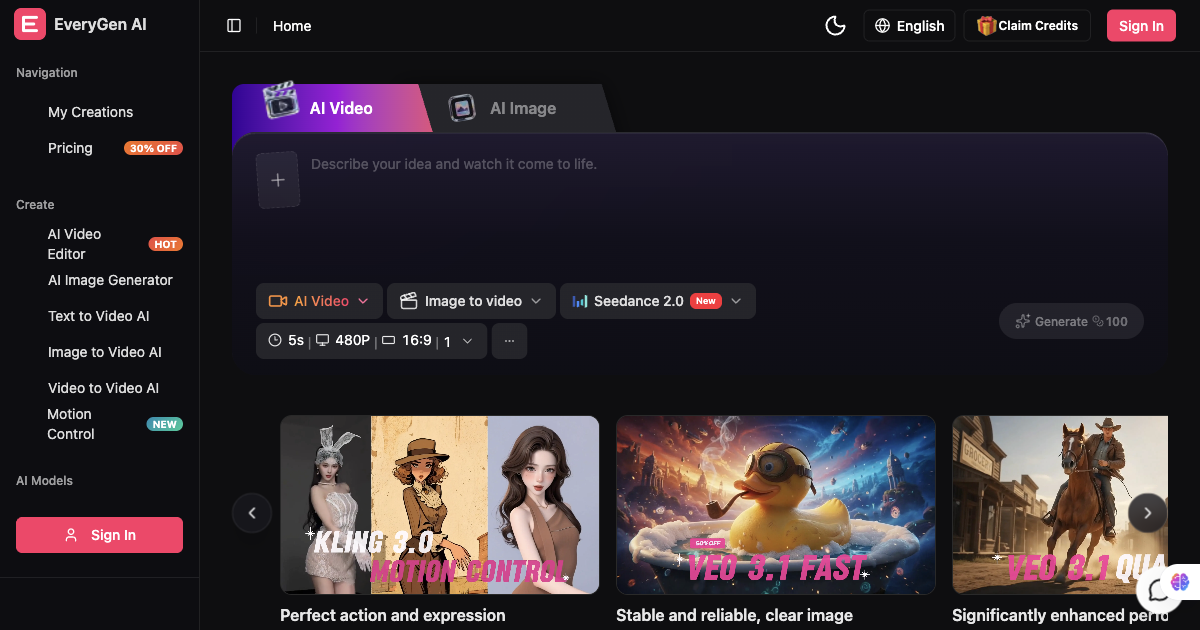
Live preview of Everygen AI's website.
Frequently asked questions
Community Reviews & Discussion
0 reviews · replies are moderated before they appear.
- No reviews yet — be the first to review Everygen AI.