Xargaar Tools Background Remover
VerifiedXargaar Tools Background Remover is a browser-based utility designed to create photo cutouts for product listings and portraits. It processes images entirely on the user's device using a local saliency model, meaning photos are never uploaded to external servers. Users can upload a single JPG, PNG, or WebP file up to 20 megabytes and 24 megapixels. The tool automatically generates an initial mask, which can be manually refined using built-in erase and restore brushes. It is intended for users who need simple background removal without creating an account or purchasing image credits. The free web version allows users to export transparent or solid-color PNG files up to 768 pixels on the longest side. A planned paid downloadable version offers higher resolution exports for offline use.
Xargaar Tools Background Remover at a glance
- What it is
- Xargaar Tools Background Remover is a browser-based utility designed to create photo cutouts for product listings and portraits.
- Who it's for
- Most useful for anyone who needs results in the Photo Editing & Restoration area without a specialist on staff.
- Primary use case
- Xargaar Tools Background Remover is a browser tool for making product-photo cutouts and other simple photo edits.
- CategoryPhoto Editing & Restoration
- PricingFree Tier
- Starting price$19
- Credit cardNo credit card required
- Bring your own keyNot supported
- RatingNo reviews yet. Be the first to rate.
Video Spot
Overview
Xargaar Tools Background Remover is a browser-based utility designed to create photo cutouts for product listings and portraits. It processes images entirely on the user's device using a local saliency model, meaning photos are never uploaded to external servers. Users can upload a single JPG, PNG, or WebP file up to 20 megabytes and 24 megapixels. The tool automatically generates an initial mask, which can be manually refined using built-in erase and restore brushes. It is intended for users who need simple background removal without creating an account or purchasing image credits. The free web version allows users to export transparent or solid-color PNG files up to 768 pixels on the longest side. A planned paid downloadable version offers higher resolution exports for offline use.
Xargaar Tools Background Remover is a browser tool for making product-photo cutouts and other simple photo edits. It uses a small local saliency model to make an initial mask, with Erase and Restore brushes for manual corrections. Photos are processed on the device rather than uploaded for removal.
Open one JPG, PNG or WebP photo at a time, up to 20MB and 24MP. Export a transparent PNG or a solid-background image for free, up to 768px on the longest side, without an account or image credits. The browser downloads the model and runtime on first use. This is not a guarantee that the hosted website works offline.
Check every cutout before use. Fine edges, hair, glass and complex scenes may need manual work; this is not professional matting. For marketplace product photos, check the marketplace's image rules. Submitted by an authorized product representative.
In detail
Xargaar Tools Background Remover is a web-based image editing utility that allows users to isolate subjects from their backgrounds. It is built for individuals creating product photos for marketplaces, designing graphics, or editing simple portraits. The tool focuses on providing an accessible, client-side solution for basic photo cutouts without requiring users to register for an account, buy a subscription, or purchase image processing credits.\n\nThe utility operates entirely within the user's web browser by downloading a small saliency model and runtime files to the local device on the first use. Because the processing happens locally, the photos are never uploaded to a remote server or third-party endpoint. Once a user selects a JPG, PNG, or WebP image, the tool automatically generates an initial cutout mask. If the automatic mask misses parts of the subject or includes unwanted background areas, users can make manual adjustments using the provided erase and restore brush tools.\n\nWhat differentiates this tool is its strict adherence to local processing and its straightforward export model. The free web interface allows users to export their edited images as transparent PNGs or with solid white, neutral, or dark backgrounds at resolutions up to 768 pixels on the longest side. The developer also lists a planned, one-time-purchase downloadable HTML version intended to function entirely offline in desktop browsers, allowing for larger exports up to 4096 pixels. Users should note that the underlying model is lightweight, meaning it is not designed for professional-grade hair matting or complex edge separation involving glass, fur, or translucent materials.
Common uses
- Removing backgrounds from product photos for e-commerce listings.
- Creating transparent PNG cutouts for graphic design projects.
- Isolating subjects in portrait photographs.
- Processing private or sensitive images that cannot be uploaded to cloud servers.
Pros
- Processes images locally, ensuring privacy since files are not uploaded.
- Does not require an account or the purchase of image credits.
- Provides manual brush tools to correct the automatic cutout.
- Offers a free web version for standard-resolution exports.
Cons
- The web version restricts free exports to a maximum of 768 pixels on the longest side.
- Struggles with complex edges like hair, fur, glass, and translucent fabrics.
- Processes only one photograph at a time, lacking batch processing capabilities.
- Heavy reliance on device memory can cause slow performance on mobile phones.
Generated from the listing's details and not yet checked by a Zoipi editor.
Key Features
- Local image processing: Photos are processed entirely on the user's device without being uploaded to external servers.
- Format support: Accepts JPG, PNG, and WebP image files up to 20 megabytes and 24 megapixels.
- Manual adjustment brushes: Includes erase and restore tools to manually fix errors in the automatic mask.
- Background options: Users can export the subject with a transparent background or choose a solid white, warm neutral, or dark background.
- Free standard exports: The web tool permits free downloads of edited images up to 768 pixels on the longest side.
- Account-free usage: The tool operates without requiring user registration, subscriptions, or image credits.
Best For
- Anyone replacing a manual photo editing & restoration process with something faster
- Anyone testing the space without an upfront budget
Pricing Model
Free Tier. Generous ongoing free tier you can start with, no credit card needed. Paid plans unlock higher limits.
Pricing Breakdown
Screenshots
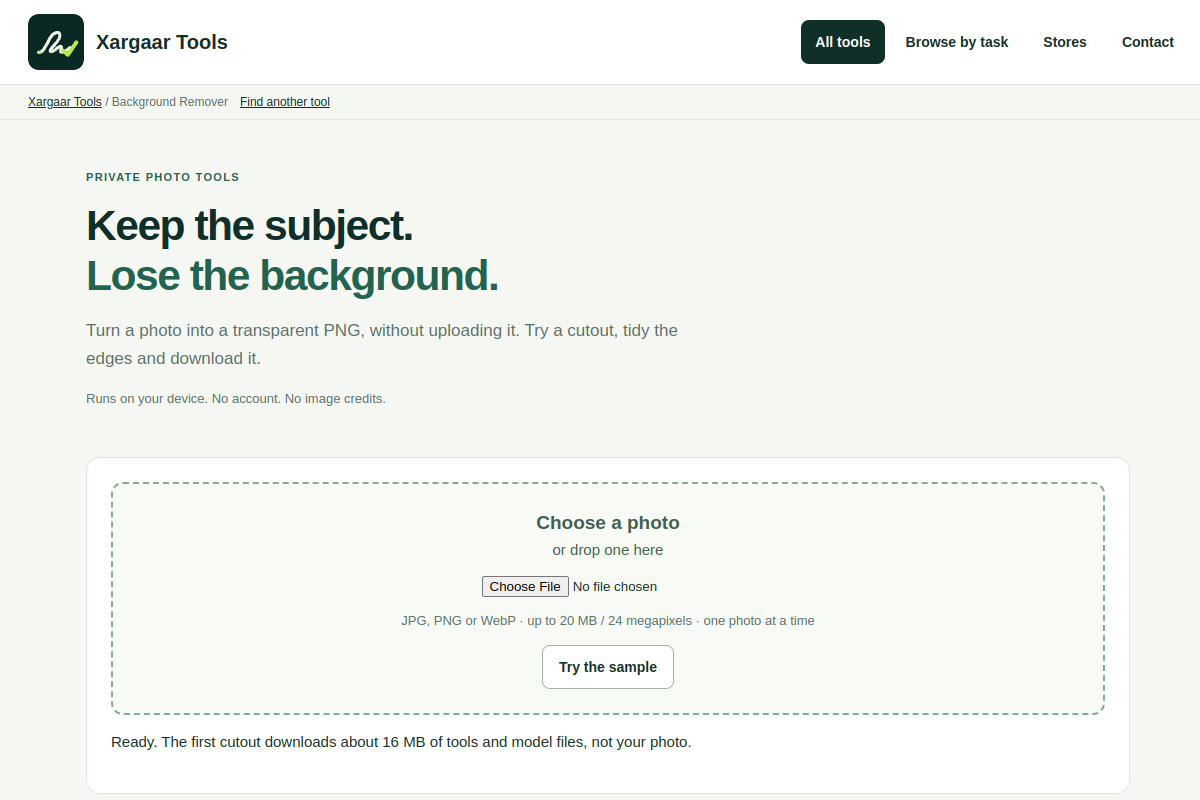
Live preview of Xargaar Tools Background Remover's website.
Frequently asked questions
Community Reviews & Discussion
0 reviews · replies are moderated before they appear.
- No reviews yet — be the first to review Xargaar Tools Background Remover.