
ShopEDown
VerifiedShopEDown is a Chrome and Edge browser extension for Shopee sellers, dropshippers, affiliates and researchers. It reads any Shopee product page and saves everything the listing holds: full-size main and variant images, description images, the original product video, and buyer review photos, videos and text. Files are organized into one numbered folder per product and exported alongside spreadsheets in Excel and CSV. It works across all ten Shopee country sites on desktop. The free tier covers images, product info, SKU data and a limited number of reviews with AI sentiment labels, while the paid Pro tier unlocks video downloads, review media, full review export and one-click bulk downloading. Files move directly from Shopee's servers to the user's disk.
ShopEDown at a glance
- What it is
- ShopEDown is a Chrome and Edge browser extension for Shopee sellers, dropshippers, affiliates and researchers.
- Who it's for
- A good fit for users working with Product Staging who want to cut the manual steps.
- Primary use case
- ShopEDown is a Chrome extension (it also installs in Microsoft Edge) for Shopee sellers, dropshippers and researchers.
- CategoryAI E-Commerce & Retail
- PricingFree Tier
- Starting priceFree, paid plans available
- Credit cardNo credit card required
- Bring your own keyNot supported
- RatingNo reviews yet. Be the first to rate.
Video Spot
Overview
ShopEDown is a Chrome and Edge browser extension for Shopee sellers, dropshippers, affiliates and researchers. It reads any Shopee product page and saves everything the listing holds: full-size main and variant images, description images, the original product video, and buyer review photos, videos and text. Files are organized into one numbered folder per product and exported alongside spreadsheets in Excel and CSV. It works across all ten Shopee country sites on desktop. The free tier covers images, product info, SKU data and a limited number of reviews with AI sentiment labels, while the paid Pro tier unlocks video downloads, review media, full review export and one-click bulk downloading. Files move directly from Shopee's servers to the user's disk.
ShopEDown is a Chrome extension (it also installs in Microsoft Edge) for Shopee sellers, dropshippers and researchers. Open any Shopee product page and it saves the listing into one folder per product, named after the site, item ID and title, with numbered subfolders from 01_Main to 06_Review_Videos and the spreadsheets beside them. It works on all ten Shopee sites (SG, MY, ID, TH, PH, VN, TW, BR, MX, AR) on desktop; the interface comes in 16 languages.
Free and unlimited, no account: main images, every variant image (named after its option, for example variant_02_Cream.jpg), the long description images, the product-info sheet and every SKU with price, stock and units sold, as Excel and CSV.
Shopee has no save button for product videos. ShopEDown saves the exact MP4 Shopee stores, in the highest resolution the listing has, with no watermark added and no re-encoding. A logo the seller put inside the video stays. No link to paste, no screen recording.
Reviews: save review photos and review videos, and export reviews to Excel and CSV with an AI sentiment label per review (positive, neutral, negative). 200 reviews by default, up to 500, or only the 1 to 3 star ones, which is where the complaint that keeps coming back shows up.
Pro ($7.99/month or $79.99 lifetime, 7-day refund) adds videos, review media, review export and one-click download of everything. ShopEDown reads what the page has already loaded and sends Shopee nothing extra while you browse; files go from Shopee straight to your disk, never through ShopEDown's servers. It does not download Shopee Live or the Shopee Video feed, and it is an independent tool, not affiliated with Shopee.
In detail
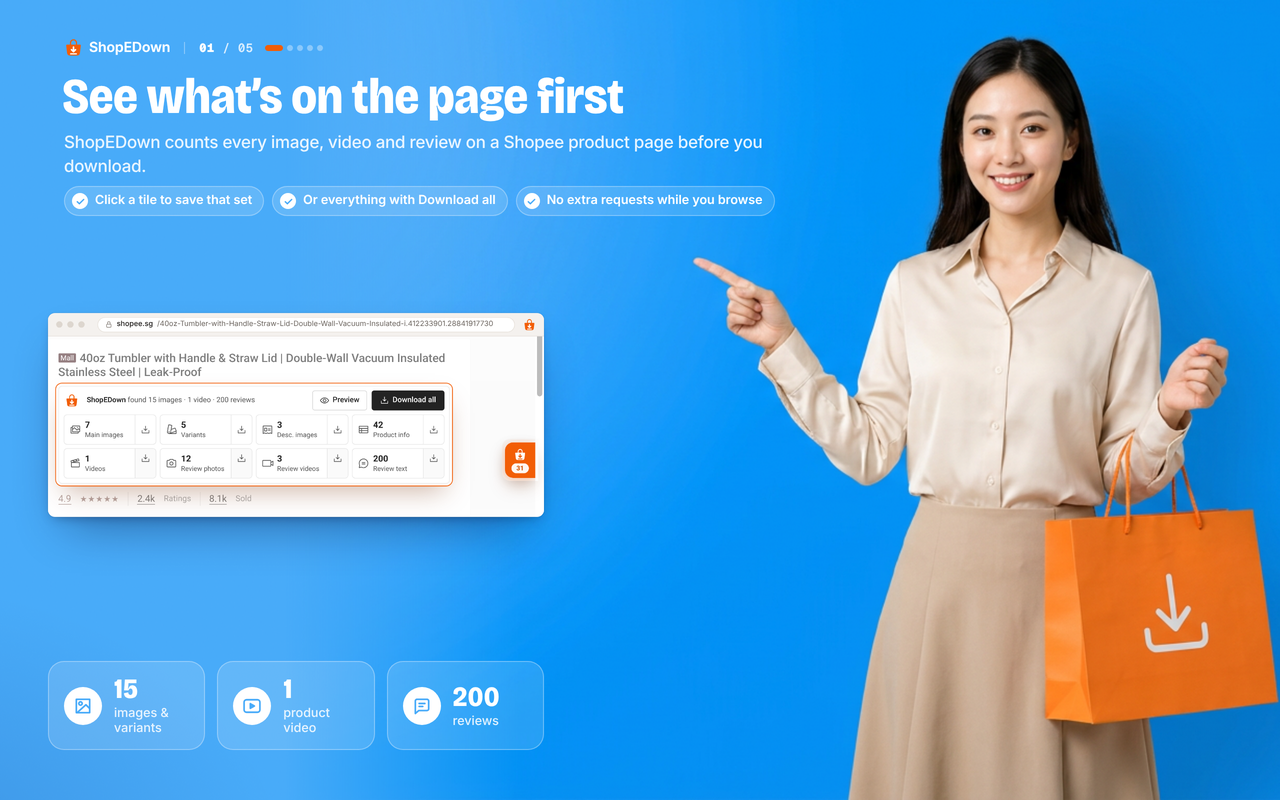
ShopEDown is a browser extension for Chrome and Edge that works on Shopee product pages. Instead of requiring a link to paste, it reads the page you already have open and shows a card counting the images, video and reviews it found. From there, a single click downloads any category of content into a dedicated folder for that product.
It is built for people who deal with Shopee listings regularly: sellers who want to relist a product on another Shopee country site, dropshippers pulling supplier content, affiliates who want a clean product video for a post, and researchers or designers studying competitor listings and buyer feedback. It supports all ten Shopee country sites and offers a 16-language interface.
Technically, ShopEDown extracts full-size main, variant and description images (variant images are named after their option), exports product info and every SKU's price and stock to Excel and CSV, and saves the product video as the original MP4 in the highest resolution the listing offers, without adding a watermark or re-encoding. If a seller embedded their own logo in the video, that stays, since the file is untouched. Reviews can be exported with text, stars, photos and videos, and each review gets an AI sentiment label (positive, neutral, negative). Everything downloads directly from Shopee's servers to the user's disk without passing through ShopEDown's own servers, and nothing extra is sent to Shopee while browsing.
What differentiates it from online paste-a-link downloaders or screen recorders is that it captures a whole listing in one click rather than one video at a time, preserves original video quality instead of re-encoding, and also pulls images, reviews and SKU data that those alternatives don't touch. The tradeoff is that it only runs on desktop Chrome or Edge, not on mobile, and it cannot access Shopee Live streams or the separate Shopee Video feed, only content attached to a product listing page.
The free tier is unlimited for images, product info and SKU exports, plus a capped number of reviews with sentiment labels. The Pro tier adds video downloads, review photos and videos, full review export, and one-click bulk download of everything on a listing, for a monthly or lifetime fee with a short refund window.
Common uses
- Relisting a product on another Shopee country site using the original images and video
- Affiliates reposting a clean, watermark-free product video with its cover image
- Dropshippers pulling supplier images, video and product data to set up their own listing
- Product research by comparing competitor demo videos and reading buyer sentiment
- Designers pulling a client's existing product video and images instead of waiting for new assets
- Exporting buyer reviews and sentiment for feedback analysis
Pros
- Free tier covers unlimited images, product info and SKU export with no account needed
- Saves original video files with no watermark and no re-encoding
- Captures far more than video alone: images, variants, reviews and SKU data in one click
- Works across all ten Shopee country sites with a multi-language interface
- Files transfer directly from Shopee to the user's disk, never through ShopEDown's servers
Cons
- Desktop-only extension; does not work on phones
- Cannot download Shopee Live streams or the Shopee Video feed, only product page content
- Video downloads, review media and full review export require the paid Pro plan
- Free tier limits reviews to a capped number rather than the full set
Generated from the listing's details and not yet checked by a Zoipi editor.
Key Features
- No-link workflow: opens directly on any Shopee product page without pasting a URL
- Unwatermarked video download: saves the original MP4 at the listing's highest resolution with no re-encoding
- Full image capture: main, variant and description images saved at full size and named by option
- Review export: review text, photos and videos exported to Excel and CSV with AI sentiment labels
- One folder per product: numbered subfolders (01_Main through 06_Review_Videos) plus spreadsheets
- Product and SKU data export: title, price, sales, rating, shop and every SKU to Excel and CSV
- One-click bulk download: grabs every category from a listing at once (Pro)
- Multi-site support: works across all ten Shopee country sites with a 16-language interface
Best For
- Specialists looking for a dedicated tool rather than a general assistant
- Creators exploring Product Staging
- Anyone testing the space without an upfront budget
Pricing Model
Free Tier. Generous ongoing free tier you can start with, no credit card needed. Paid plans unlock higher limits.
Pricing Breakdown
Screenshots
Live preview of ShopEDown's website.
Frequently asked questions
Community Reviews & Discussion
0 reviews · replies are moderated before they appear.
- No reviews yet — be the first to review ShopEDown.