ReWords AI
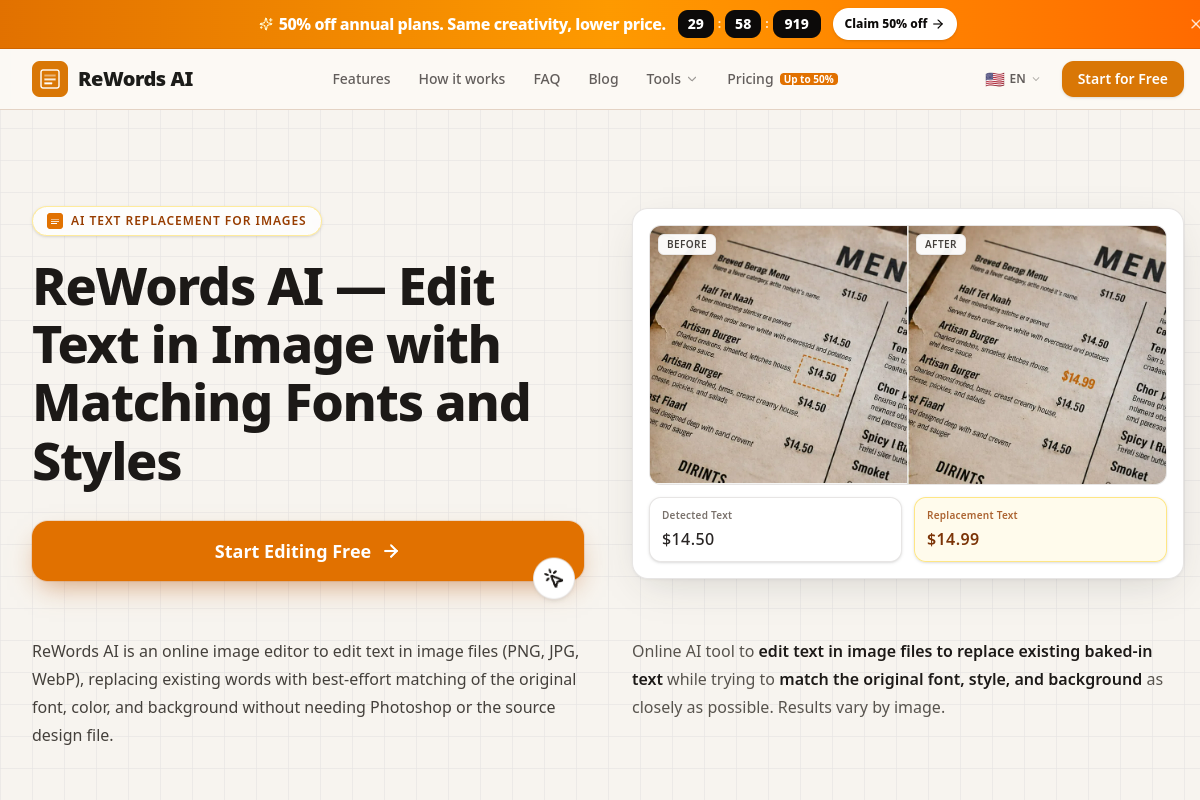
VerifiedReWords AI is a browser-based tool for editing text that is already baked into images such as PNG, JPG, and WebP files. Instead of using Photoshop or needing the original design files, users upload an image, click on detected text or draw a box around it, and type replacement text. The AI attempts to match the original font, color, and background, or removes the text entirely if the replacement field is left blank. It also supports translating text within images. The tool is aimed at creators, marketers, and e-commerce sellers who need to update marketing banners, fix garbled AI-generated image text, revise product imagery, or correct screenshots without rebuilding graphics from scratch.
ReWords AI at a glance
- What it is
- ReWords AI is a browser-based tool for editing text that is already baked into images such as PNG, JPG, and WebP files.
- Who it's for
- Aimed at makers and small teams exploring the Photo Editing & Restoration category.
- Primary use case
- ReWords AI is a free, browser-based tool for editing the text inside images without Photoshop skills.
- CategoryPhoto Editing & Restoration
- PricingFree Tier
- Starting price$5.99/pack
- Credit cardNo credit card required
- Bring your own keyNot supported
- RatingNo reviews yet. Be the first to rate.
Video Spot
Overview
ReWords AI is a browser-based tool for editing text that is already baked into images such as PNG, JPG, and WebP files. Instead of using Photoshop or needing the original design files, users upload an image, click on detected text or draw a box around it, and type replacement text. The AI attempts to match the original font, color, and background, or removes the text entirely if the replacement field is left blank. It also supports translating text within images. The tool is aimed at creators, marketers, and e-commerce sellers who need to update marketing banners, fix garbled AI-generated image text, revise product imagery, or correct screenshots without rebuilding graphics from scratch.
ReWords AI is a free, browser-based tool for editing the text inside images without Photoshop skills. Upload a screenshot, poster, meme, YouTube thumbnail, flyer, or product packaging shot (PNG, JPG, or WebP), click the text you want to change, and type the new words — the AI best-effort matches the original font, color, and background so the edit blends in. Leave the field blank to cleanly remove text instead. It can also translate text in images and suggest translations for free. Sign in for trial credits with no credit card required; affordable credit packs and monthly plans are available for heavier use. Great for creators, marketers, and e-commerce sellers.
In detail
ReWords AI is an online tool built specifically for editing text that is already flattened into an image, a task that traditionally required Photoshop skills, clone stamping, and manual font matching. Users upload a PNG, JPG, or WebP file, then either click on text the tool has automatically detected or draw a selection box around text it missed. Typing new text into the field replaces the original, and leaving the field blank removes the text and reconstructs the background instead.
The tool is designed for creators, marketers, students, and e-commerce sellers who regularly need to make small text changes to finished image assets. Common scenarios include fixing garbled or misspelled text in AI-generated images from tools like Midjourney or DALL-E, updating discount percentages and dates on marketing banners, changing headlines or handles on social graphics, revising packaging labels or price tags on product photos, translating slogans and notices for international audiences, and updating button labels or captions in app and web mockups.
Technically, the process involves detecting text regions, erasing the original pixels, reconstructing the background behind them, analyzing the original font's weight, color, style, and spacing, and then rendering and compositing new text that attempts to match the original look. Processing a generation typically takes 15 to 30 seconds, and users can edit multiple text regions in a single image for one credit cost regardless of how many changes are made within that image.
What sets ReWords AI apart from general-purpose editors like Photoshop or Canva is its narrow focus: rather than offering a full suite of layered editing tools, it gives users one streamlined task of selecting text and typing a replacement, with the AI handling background repair and style matching automatically. This makes it suited to quick, repetitive copy edits rather than complex multi-layer design work.
Pricing runs on a credit system, where 10 credits covers one standard 1K image edit, with higher resolutions (2K and 4K) costing more credits and available only on subscription plans. New users receive a free edit after signing in, with no credit card required, and both one-time credit packs and monthly or annual subscription plans are available for heavier use.
Common uses
- Fixing garbled or misspelled text in AI-generated images from tools like Midjourney or DALL-E
- Updating marketing banners with new discount percentages, dates, or calls to action
- Changing headlines, tags, or handles on social media graphics and YouTube thumbnails
- Revising product packaging labels, price tags, or feature callouts for e-commerce listings
- Translating slogans, notices, or infographics for international audiences
- Correcting typos or outdated labels in UI screenshots and app mockups
Pros
- Edits text directly on finished, flattened images without needing the original design file
- Automatically detects text and matches font, color, and background, reducing manual design work
- Supports translation of in-image text in addition to simple replacement
- Offers a free trial edit after sign-in with no credit card required
- Flexible pricing with both one-time credit packs and subscription plans
Cons
- Higher resolution output (2K and 4K) is locked to subscription plans and not available with one-time credit packs
- Results depend on the image and are described as best-effort, so font and background matching may not always be perfect
- Credits on monthly subscriptions expire at the end of the billing period if unused
- Focused narrowly on text replacement rather than broader photo editing or design work
Generated from the listing's details and not yet checked by a Zoipi editor.
Key Features
- Automatic text detection: scans uploaded images and highlights existing text blocks for one-click selection
- Manual selection box: lets users draw a box around text the auto-detection misses
- Font and style matching: analyzes the original font's color, weight, and style to generate a best-effort match
- Background reconstruction: inpaints the area behind replaced or removed text to keep the image seamless
- Text removal: leaving the replacement field blank removes the text and fills in the background
- In-image translation: replaces original text with a translated version while preserving visual style
- Multi-region editing: multiple text changes in one image are processed for a single credit cost
Best For
- Specialists who want a dedicated photo editing & restoration tool rather than a general assistant
- Anyone testing the space without an upfront budget
Pricing Model
Free Tier. Generous ongoing free tier you can start with, no credit card needed. Paid plans unlock higher limits.
Pricing Breakdown
Screenshots
Live preview of ReWords AI's website.
Frequently asked questions
Community Reviews & Discussion
0 reviews · replies are moderated before they appear.
- No reviews yet — be the first to review ReWords AI.