MarkAny
VerifiedMarkAny is a web-based converter that turns documents into Markdown and Markdown back into documents. It accepts PDF, Word, Excel, PowerPoint, HTML, EPUB, images, and pasted text, converting them into structured Markdown with automatic OCR for scans and images. It also converts Markdown into DOCX, PDF, HTML, PNG, JPG, WebP, EPUB, PPTX, and XLSX. Users can batch up to five files at a time (50MB each, 250MB total), preview results before downloading, and track per-file conversion status. It's aimed at people who need to repurpose documents for publishing, research, or documentation. New accounts get limited free conversion credits, with a Pro subscription required for continued use.
MarkAny at a glance
- What it is
- MarkAny is a web-based converter that turns documents into Markdown and Markdown back into documents.
- Who it's for
- Aimed at makers and small teams exploring the Automation & Productivity category.
- Primary use case
- MarkAny is a web-based file and Markdown converter that batch-converts PDF, Word, Excel, PowerPoint, HTML, EPUB, and image files into structured Markdown with automatic OCR for scans and images.
- CategoryAutomation & Productivity
- PricingFree Tier
- Starting price$4.1/month (billed yearly at $49/year)
- Credit cardNo credit card required
- Bring your own keyNot supported
- RatingNo reviews yet. Be the first to rate.
Video Spot
Overview
MarkAny is a web-based converter that turns documents into Markdown and Markdown back into documents. It accepts PDF, Word, Excel, PowerPoint, HTML, EPUB, images, and pasted text, converting them into structured Markdown with automatic OCR for scans and images. It also converts Markdown into DOCX, PDF, HTML, PNG, JPG, WebP, EPUB, PPTX, and XLSX. Users can batch up to five files at a time (50MB each, 250MB total), preview results before downloading, and track per-file conversion status. It's aimed at people who need to repurpose documents for publishing, research, or documentation. New accounts get limited free conversion credits, with a Pro subscription required for continued use.
MarkAny is a web-based file and Markdown converter that batch-converts PDF, Word, Excel, PowerPoint, HTML, EPUB, and image files into structured Markdown with automatic OCR for scans and images. It also turns editable Markdown into DOCX, PDF, HTML, PNG, JPG, WebP, EPUB, PPTX, and XLSX.
In detail
MarkAny is a file conversion tool built around Markdown as a central format. It lets users batch-convert PDF, Word, Excel, PowerPoint, HTML, EPUB, images, and pasted text into Markdown, and also go the other way, turning Markdown into DOCX, PDF, HTML, PNG, JPG, WebP, EPUB, PPTX, and XLSX.
The tool is aimed at people who want to repurpose existing documents: turning a Word or PDF draft into a blog post, converting papers and reports into structured notes for research and AI tools, or moving handbooks and slides into Markdown for documentation sites. Anyone handling batches of mixed-format documents who wants a consistent, portable Markdown output would find this useful.
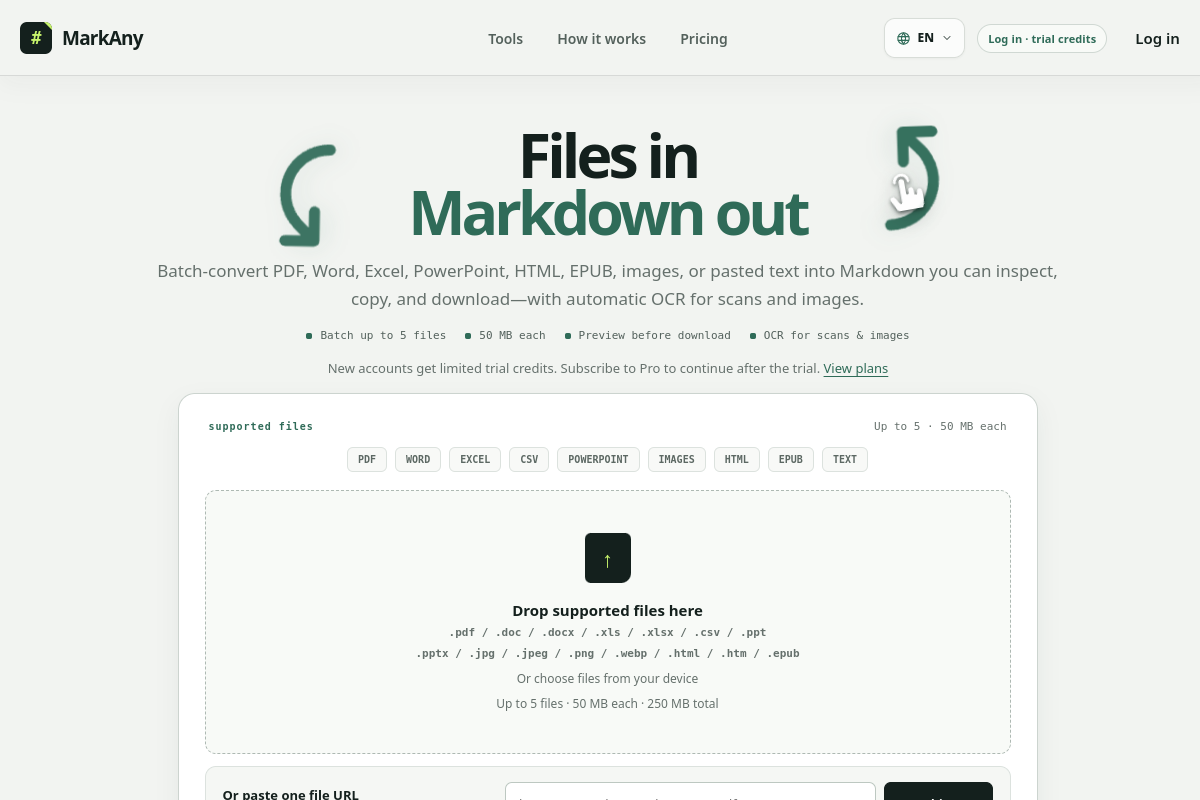
In practice, users add files by dropping them, choosing from their device, or pasting a public HTTPS link, up to five files of one supported type at a time, each up to 50MB and 250MB total. MarkAny then maps the source content to Markdown structures like headings, lists, tables, links, and images where the source exposes them, and applies automatic OCR to scanned PDFs and images without requiring a language selection step. Each file in a batch shows a status (waiting, converting, completed, needs-review, failed, cancelled), and users can preview and review results before downloading a .md file or a full ZIP with extracted images.
What distinguishes MarkAny is its two-way conversion and its explicit treatment of result quality: a 'completed' status means processing finished, not that content has been verified, so the tool flags things like complex multi-column layouts, merged cells, diagrams, and scanned tables as needing manual review. Failed or cancelled items in a batch can be retried individually without losing successful results.
New accounts receive five free conversion credits covering both directions (file-to-Markdown and Markdown-to-file). After that, continued use requires a Pro subscription, available monthly or yearly. No card is required to use the initial trial credits.
Common uses
- Converting a Word or PDF draft into a blog post without rebuilding the article
- Turning research papers and reports into structured notes for search, summaries, and AI tools
- Moving handbooks, slides, and HTML content into Markdown for documentation sites
- Extracting text from scanned PDFs or images using automatic OCR
- Converting spreadsheet data into structured Markdown tables for documentation
- Exporting edited Markdown back into Word, PDF, or other office formats
Pros
- Supports a wide range of input formats including PDF, Word, Excel, PowerPoint, HTML, EPUB, and images
- Converts in both directions, from files to Markdown and Markdown back to files
- Automatic OCR with no language-selection step
- Per-file status tracking makes it easy to see and retry failed conversions in a batch
- Free trial credits available without requiring a card
Cons
- Batch size is limited to five files at a time and 50MB per file
- Only two conversions can run simultaneously
- Continued use after trial credits requires a paid Pro subscription
- Complex layouts like multi-column pages, merged cells, and diagrams may need manual review
Generated from the listing's details and not yet checked by a Zoipi editor.
Key Features
- Batch file-to-Markdown conversion: Convert up to five files of one type at once, 50MB each, 250MB total
- Markdown-to-file export: Turn Markdown into DOCX, PDF, HTML, PNG, JPG, WebP, EPUB, PPTX, or XLSX
- Automatic OCR: Scanned PDFs and supported images are processed with OCR without a language-selection step
- Structure mapping: Preserves headings, lists, tables, links, and images where the source exposes them
- Per-file status tracking: See waiting, converting, completed, needs-review, failed, or cancelled states and retry individually
- Preview before download: Inspect converted results and compatibility notes before exporting
- ZIP output with assets: Download complete packages with Markdown, image directories, and relative image paths when images are extracted
Best For
- Specialists who want a dedicated automation & productivity tool rather than a general assistant
- Anyone testing the space without an upfront budget
Pricing Model
Free Tier. Generous ongoing free tier you can start with, no credit card needed. Paid plans unlock higher limits.
Pricing Breakdown
Screenshots
Live preview of MarkAny's website.
Frequently asked questions
Community Reviews & Discussion
0 reviews · replies are moderated before they appear.
- No reviews yet — be the first to review MarkAny.