jsonl.co
Verifiedjsonl.co is a free browser-based viewer and editor for JSONL and NDJSON files, aimed at developers and ML practitioners who work with large datasets such as OpenAI fine-tuning files, Hugging Face training data, and application logs. It streams files up to 1GB and beyond in chunks, rendering only visible rows so large datasets open instantly without crashing the browser. All processing happens locally, with no uploads or account required. The tool shows raw JSONL alongside parsed JSON with synchronized scrolling and syntax highlighting, validates lines in real time, and supports editing, find and replace, and export. It also includes a set of related converters and utilities for working with JSONL data in different formats.
jsonl.co at a glance
- What it is
- jsonl.co is a free browser-based viewer and editor for JSONL and NDJSON files, aimed at developers and ML practitioners who work with large datasets such as OpenAI fine-tuning files, Hugging Face training data, and application logs. It stre.
- Who it's for
- A good fit for users working with Web Scraping & Data Extraction who want to cut the manual steps.
- Primary use case
- jsonl.co is a free online viewer and editor for JSONL (JSON Lines / NDJSON) files, built for the large files that make most tools freeze.
- CategoryWeb Scraping & Data Extraction
- PricingFree Tier
- Starting priceFree, paid plans available
- Credit cardNo credit card required
- Bring your own keyNot supported
- RatingNo reviews yet. Be the first to rate.
Video Spot
Overview
jsonl.co is a free browser-based viewer and editor for JSONL and NDJSON files, aimed at developers and ML practitioners who work with large datasets such as OpenAI fine-tuning files, Hugging Face training data, and application logs. It streams files up to 1GB and beyond in chunks, rendering only visible rows so large datasets open instantly without crashing the browser. All processing happens locally, with no uploads or account required. The tool shows raw JSONL alongside parsed JSON with synchronized scrolling and syntax highlighting, validates lines in real time, and supports editing, find and replace, and export. It also includes a set of related converters and utilities for working with JSONL data in different formats.
jsonl.co is a free online viewer and editor for JSONL (JSON Lines / NDJSON) files, built for the large files that make most tools freeze. It streams files in chunks and renders only the visible rows, so datasets of 1GB and more open instantly in the browser.
Everything runs 100% locally: files are never uploaded, there is no account and no limits, which makes it safe for sensitive data such as AI training sets and production logs.
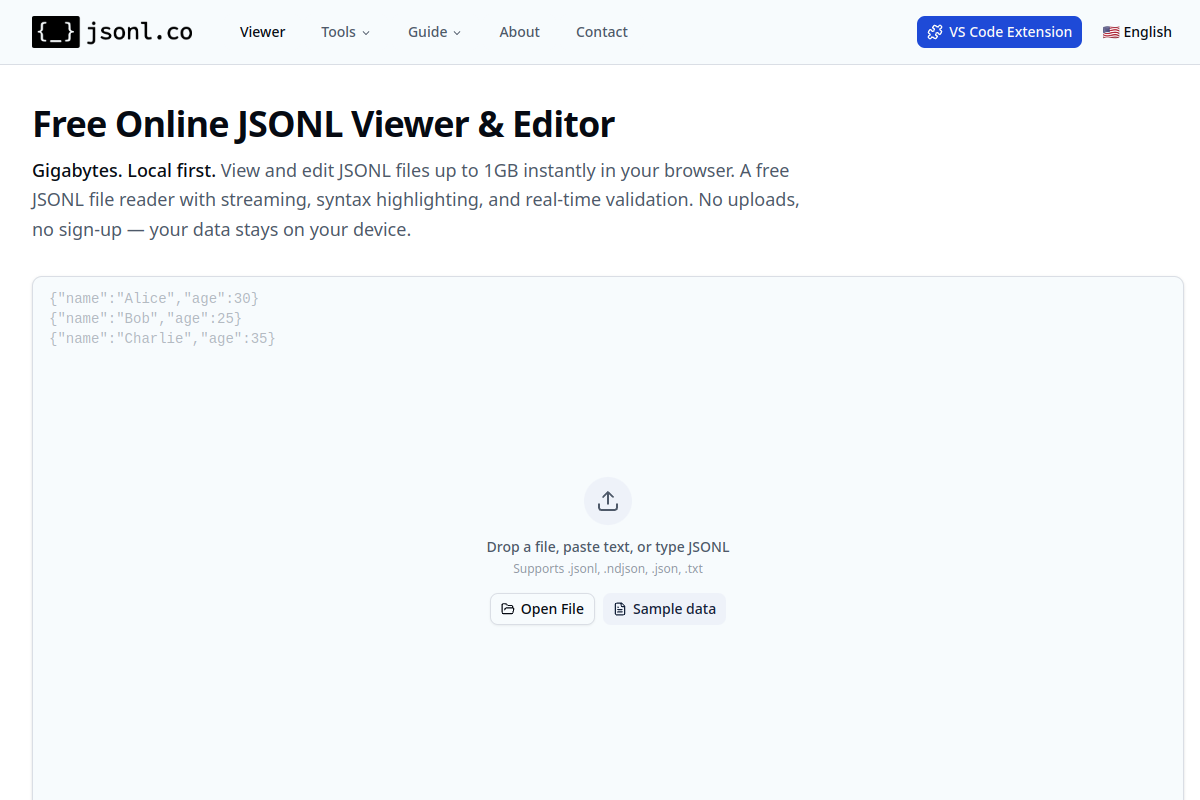
Drop a file, paste text or type JSONL to see raw lines on the left and parsed JSON on the right, with synchronized scrolling, syntax highlighting and real-time line-by-line validation. Edit or delete lines, use find & replace, and export with one click. Also includes free converters (JSONL to JSON, CSV, Excel, YAML), a validator, splitter and merger.
In detail
jsonl.co is a free, browser-based viewer and editor built specifically for JSONL (JSON Lines) and NDJSON files. These formats store one JSON object per line and are commonly used for streaming data, application logs, and machine learning datasets, including those from OpenAI, Hugging Face, and other platforms. Many general-purpose tools struggle or crash when opening very large files, so jsonl.co focuses on handling files up to 1GB and beyond without freezing the browser.
The tool is aimed at developers, data engineers, and ML practitioners who need to inspect, edit, or validate large line-delimited JSON datasets, such as OpenAI fine-tuning files, Hugging Face training data, or production log files. It works by streaming the file in chunks and rendering only the currently visible portion, which keeps memory use low and lets large files load almost instantly. Users can drop in a file, paste text, or type JSONL directly to start working with it.
Once a file is loaded, jsonl.co displays the raw JSONL on one side and the parsed JSON on the other, with synchronized scrolling and syntax highlighting. It validates each line in real time, flagging syntax errors as they appear. For smaller files, users can edit the raw text directly, add or delete lines, and use find and replace, then export the result with one click.
What sets jsonl.co apart is that all processing happens locally in the browser: files are never uploaded to a server, there is no sign-up, and there are no stated limits on use, which makes it suitable for sensitive or proprietary data like AI training sets. Beyond the core viewer and editor, jsonl.co offers a collection of related tools, including converters between JSONL and JSON, CSV, Excel, and YAML, a standalone validator, a splitter for breaking large files into smaller chunks, and a merger for combining multiple JSONL files. A VS Code extension is also mentioned for working with large JSONL files inside a project or over Remote-SSH.
Overall, jsonl.co positions itself as a practical, no-cost utility for anyone who regularly handles large line-delimited JSON files and needs a fast, private way to view, validate, edit, and convert them without installing software or risking data exposure.
Common uses
- Inspecting and validating OpenAI fine-tuning or Batch API JSONL datasets
- Reviewing Hugging Face training data before running ML pipelines
- Debugging large application or server log files stored in JSONL/NDJSON format
- Converting JSONL data to CSV or Excel for sharing with non-technical stakeholders
- Splitting a large JSONL dataset into smaller chunks for batch API limits
- Merging multiple JSONL files into a single consolidated dataset
Pros
- Free to use with no sign-up or account required
- Handles very large files (1GB+) without crashing, unlike many general-purpose viewers
- All processing is local, which protects sensitive or proprietary data
- Combines viewing, editing, validation, and conversion in one tool
- Includes a VS Code extension for working with files inside a project
Cons
- Full editing is noted as suited to smaller files, which may limit workflows on the largest datasets
- Focused specifically on JSONL/NDJSON and related conversions rather than broader data formats
- No mention of collaboration, cloud storage, or team features
Generated from the listing's details and not yet checked by a Zoipi editor.
Key Features
- Streaming large file support: opens JSONL files up to 1GB or more in chunks so they load instantly
- Local-only processing: all parsing and editing happen in the browser with no uploads or sign-up
- Side-by-side view: raw JSONL on the left and parsed JSON on the right with synchronized scrolling and syntax highlighting
- Real-time validation: checks each line as you work and flags syntax errors
- In-browser editing: edit or delete lines, use find & replace, and export the result
- Format converters: convert between JSONL and JSON, CSV, Excel, and YAML
- Splitter and merger: split large JSONL files by line count or size, or merge multiple files into one
- NDJSON support: opens and displays .ndjson files the same way as JSONL
Best For
- Specialists who want a dedicated web scraping & data extraction tool rather than a general assistant
- Anyone testing the space without an upfront budget
Pricing Model
Free Tier. Generous ongoing free tier you can start with, no credit card needed. Paid plans unlock higher limits.
Pricing Breakdown
Screenshots
Live preview of jsonl.co's website.
Frequently asked questions
Community Reviews & Discussion
0 reviews · replies are moderated before they appear.
- No reviews yet — be the first to review jsonl.co.