
Humanize Ink
VerifiedHumanize Ink is a free, browser-based tool that rewrites English drafts in a different tone. Users paste text, choose Natural, Professional or Casual, and optionally set rewrite strength, readability level or a custom writing sample. Results appear side by side with the original so changes can be reviewed, locally edited and copied. It also includes local browser utilities like a word frequency counter and comma separator, plus writing prompt generators. It's aimed at students, bloggers, marketers and writers who want to reword AI-assisted or human drafts without signing up, subject to hourly and daily usage limits.
Humanize Ink at a glance
- What it is
- Humanize Ink is a free, browser-based tool that rewrites English drafts in a different tone.
- Who it's for
- Most useful for anyone who needs results in the AI Detection & Humanizers area without a specialist on staff.
- Primary use case
- Humanize Ink is a free AI text rewriting tool for people who want to rephrase English drafts so they read more naturally.
- CategoryAI Detection & Humanizers
- PricingFree Tier
- Starting priceFree, paid plans available
- Credit cardNo credit card required
- Bring your own keyNot supported
- RatingNo reviews yet. Be the first to rate.
Video Spot
Overview
Humanize Ink is a free, browser-based tool that rewrites English drafts in a different tone. Users paste text, choose Natural, Professional or Casual, and optionally set rewrite strength, readability level or a custom writing sample. Results appear side by side with the original so changes can be reviewed, locally edited and copied. It also includes local browser utilities like a word frequency counter and comma separator, plus writing prompt generators. It's aimed at students, bloggers, marketers and writers who want to reword AI-assisted or human drafts without signing up, subject to hourly and daily usage limits.
Humanize Ink is a free AI text rewriting tool for people who want to rephrase English drafts so they read more naturally. It runs in the browser at humanizeink.com, and it does not require a signup or any payment details. There are no paid plans or subscriptions.
Who it is for: students, bloggers, marketers, freelance writers, support teams and anyone who drafts English text, including text produced with AI assistance, and wants a reworded version in a different tone before editing it further by hand.
How to use it, step by step: 1. Open humanizeink.com in your browser. 2. Paste your English draft into the input box. Each attempt accepts up to 1,200 words. 3. Choose one of three tones: Natural, Professional or Casual. 4. Run the rewrite and review the result in the side-by-side comparison, which shows your original text next to the rewritten version. 5. Use local editing to adjust any sentence you want to change, then copy the final text.
What each feature does: - Three tones: Natural aims for everyday, plain wording; Professional suits work email, reports and business writing; Casual gives a relaxed, conversational result. - Side-by-side comparison: lets you check every change against the original so you keep control of meaning. - Local editing: lets you fix details directly instead of rewriting the whole draft again.
Bundled writing utilities: Humanize Ink also includes a browser-local word frequency counter, a comma separator, and prompt generators for fanfiction, poetry and journaling. Because the counter and separator run locally in the browser, they are handy for quick checks on lists and drafts.
Limits: the tool is free within rate limits of 3 attempts per hour and 10 attempts per day per network, with up to 1,200 words per attempt. No account is needed to use it.
Humanize Ink is built by David Yang and is closed source. Always review rewritten text yourself before publishing or submitting it.
In detail
Humanize Ink is a free web tool for rewriting English text drafts into a different tone. It works entirely in the browser at humanizeink.com, requires no signup or payment, and is meant for students, bloggers, marketers, freelance writers and anyone who wants to rephrase a draft, including AI-generated text, before publishing it.
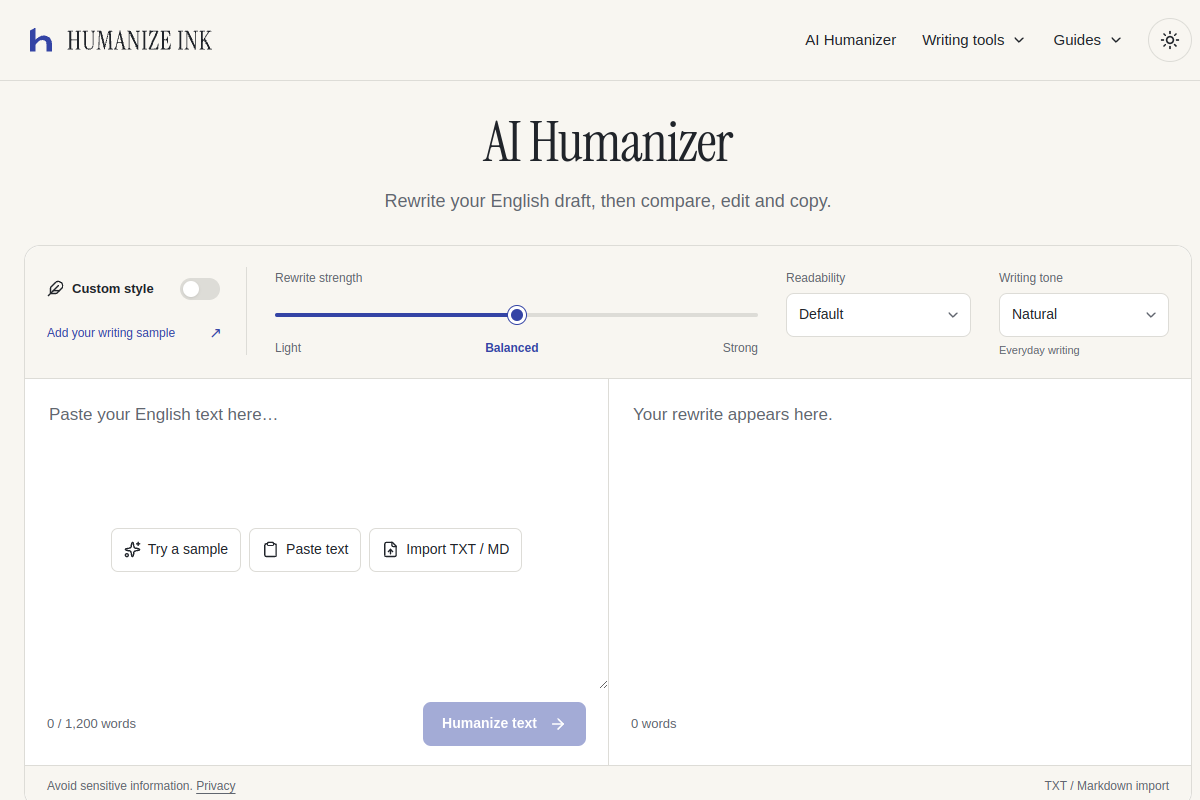
To use it, you paste a draft of up to 1,200 words (also capped at 8,000 characters and 16,000 UTF-8 bytes) into the input box, then choose a tone: Natural for everyday writing, Professional for work emails and reports, or Casual for informal messages. You can also set a rewrite strength (Light, Balanced, Strong), a target readability level, and add a custom writing sample to guide the style. Once you run the rewrite, the result appears next to your original text in a side-by-side comparison, so you can see what changed. You can then edit the result locally and copy the final version; edits are lost if you leave or reload the page.
What sets Humanize Ink apart is its emphasis on review rather than automation: it shows differences against the original rather than just replacing the text, and it explicitly states that it does not guarantee any particular AI-detector outcome. It is built for English only, and the site cautions that rewrites may not perfectly preserve facts like dates, numbers, names, quotations or citations, so users are expected to check those details themselves.
Beyond the rewriter, Humanize Ink bundles small local tools that run entirely in the browser without sending data anywhere: a word frequency counter, a comma separator for turning lists into CSV-style rows, and prompt generators for journaling, poetry, fanfiction, improv and short stories.
The service is free but rate-limited: up to 3 attempts per hour and 10 per day per network, with a shared site-wide allowance of 100 attempts per day and 10 attempts per minute, resetting at 00:00 UTC. There are no paid plans or subscriptions, and no payment details are required. The site notes that submitted text is sent to a third party for rewriting, which may retain or use it for training, so sensitive information should be avoided; the local tools do not share this limitation.
Common uses
- Rewriting an English paragraph or essay draft into a more natural or professional tone
- Reworking AI-generated or AI-assisted text before submitting or publishing it
- Adjusting the tone of a work email or report to sound more professional
- Casualizing a message for informal communication
- Checking word frequency in a draft before and after editing
- Converting a list of lines into a comma-separated or CSV format
Pros
- Free to use with no signup or payment details required
- Side-by-side comparison makes it easy to review exactly what changed
- Multiple tone and strength options allow some customization of the rewrite
- Includes useful local browser utilities that don't send data anywhere
- No guarantee of bypassing AI detectors, which the tool is upfront about
Cons
- Limited to English drafts only
- Usage is capped at 3 attempts per hour and 10 per day per network, plus a shared site-wide daily cap
- Input limited to 1,200 words / 8,000 characters per attempt, requiring longer drafts to be split
- Submitted text is sent to a third party that may retain or use it for training
Generated from the listing's details and not yet checked by a Zoipi editor.
Key Features
- Three writing tones: Natural, Professional and Casual options for rewriting your draft
- Side-by-side comparison: view your original text next to the rewritten version to check changes
- Rewrite strength and readability settings: adjust how much the text changes and its target reading level
- Custom writing sample: add a sample to guide the style of the rewrite
- Local editing: adjust the rewritten text in-browser before copying it
- Word frequency counter: calculates word counts and shares locally in the browser
- Comma separator: converts line-separated values into a comma list or CSV row locally
- Writing prompt generators: local prompts for journaling, poetry, fanfiction, improv and short stories
Best For
- People who spend real hours each week on ai detection & humanizers
- Anyone testing the space without an upfront budget
Pricing Model
Free Tier. Generous ongoing free tier you can start with, no credit card needed. Paid plans unlock higher limits.
Pricing Breakdown
Screenshots
Live preview of Humanize Ink's website.
Frequently asked questions
Community Reviews & Discussion
0 reviews · replies are moderated before they appear.
- No reviews yet — be the first to review Humanize Ink.