Fix My Ping
VerifiedFix My Ping is a free, no-login web tool that helps gamers troubleshoot high ping, jitter spikes, packet loss, and desync. Users pick the symptom that matches what they're seeing and get a single prioritized first check to try, such as testing wired Ethernet versus Wi-Fi or confirming game server region. It includes a browser-based stress test against its own Cloudflare edge (not the actual game server), a six-run before/after comparator to test one change at a time, and a local Windows ping log reader that parses ICMP logs inside the browser. Game-specific checklists cover titles like Valorant, CS2, Fortnite, Apex Legends, Tarkov, and others. It's built for gamers who want a structured, evidence-based way to isolate lag causes rather than guessing at router settings.
Fix My Ping at a glance
- What it is
- Fix My Ping is a free, no-login web tool that helps gamers troubleshoot high ping, jitter spikes, packet loss, and desync.
- Who it's for
- Aimed at makers and small teams exploring the Specialized Chat & Assistants category.
- Primary use case
- Fix My Ping helps players trace the route, try one safe change, and retest under the same match conditions.
- CategorySpecialized Chat & Assistants
- PricingFree Tier
- Starting priceFree, paid plans available
- Credit cardNo credit card required
- Bring your own keyNot supported
- RatingNo reviews yet. Be the first to rate.
Video Spot
Overview
Fix My Ping is a free, no-login web tool that helps gamers troubleshoot high ping, jitter spikes, packet loss, and desync. Users pick the symptom that matches what they're seeing and get a single prioritized first check to try, such as testing wired Ethernet versus Wi-Fi or confirming game server region. It includes a browser-based stress test against its own Cloudflare edge (not the actual game server), a six-run before/after comparator to test one change at a time, and a local Windows ping log reader that parses ICMP logs inside the browser. Game-specific checklists cover titles like Valorant, CS2, Fortnite, Apex Legends, Tarkov, and others. It's built for gamers who want a structured, evidence-based way to isolate lag causes rather than guessing at router settings.
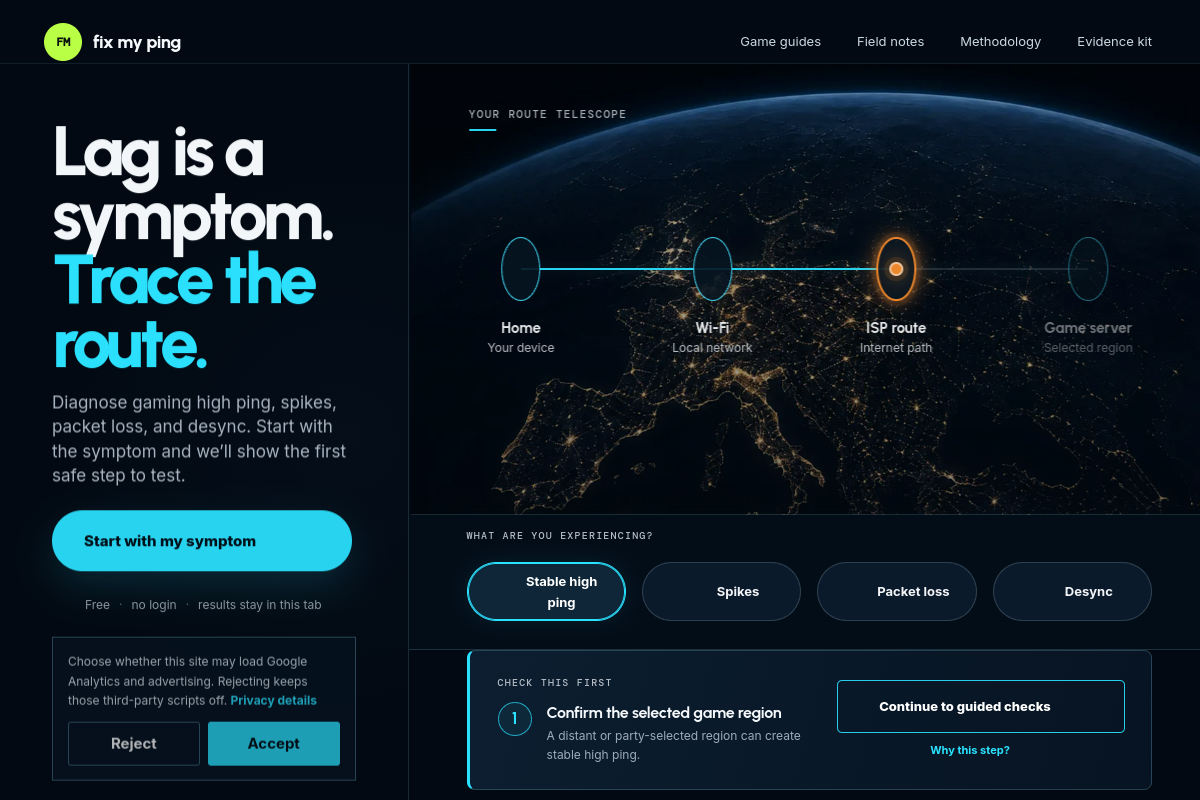
Lag is a symptom. Fix My Ping helps players trace the route, try one safe change, and retest under the same match conditions. Free player-facing guides for high ping, packet loss, and gaming lag.
In detail
Fix My Ping is a free web-based diagnostic tool aimed at gamers dealing with lag, high ping, packet loss, jitter, or desync. Rather than offering a single fix, it guides users through a process: name the symptom, get one low-risk first check, make one change, then retest under matched conditions (same game, region, device, and hour) to confirm whether the change actually helped.
The tool is for PC and console gamers troubleshooting connection issues in specific titles, including Valorant, CS2, Fortnite, Apex Legends, League of Legends, Overwatch 2, Escape from Tarkov, World of Warcraft, Genshin Impact, Dota 2, Rainbow Six Siege, and Rust. Each game has a checklist referencing that game's own telemetry displays, like Riot Direct pod routing in Valorant or Valve's SDR netgraph in CS2.
Functionally, it offers four tools: a symptom questionnaire that routes users to a first diagnostic step, a browser-based load probe that streams Cloudflare edge samples to check for home network queue bloat, a six-run comparator to validate before/after changes against median, worst-case, and spread metrics, and a local Windows ping log reader that computes median, p95, and timeout stats from ICMP logs without uploading them anywhere.
What differentiates Fix My Ping is its emphasis on evidence over single-number claims. The site explicitly warns that a browser-based test measures requests to its own Cloudflare endpoint, not the actual game server path, and that looking only at a typical ping number can hide a worsening worst-case spike. It pushes users to run three baseline matches against three post-change matches before concluding anything improved. The site also publishes field notes on topics like bufferbloat, CGNAT, DNS versus game path, VPNs, mesh and powerline networking, and hotspot versus home connections, plus a methodology page describing its limits.
Everything runs in the browser tab with no login required, and results are described as varying by location, ISP, and network conditions, so the tool is positioned as a guided diagnostic aid rather than a guaranteed fix.
Common uses
- Diagnosing why ping is steadily high in a specific game
- Identifying whether lag spikes come from Wi-Fi contention or background uploads
- Testing one network change (like switching to wired Ethernet) and verifying it actually helped using matched before/after runs
- Reading and interpreting a Windows ping log without uploading it externally
- Following a game-specific checklist for titles like Valorant or CS2 to interpret in-game network telemetry
- Distinguishing packet loss, jitter, and desync as separate issues requiring different fixes
Pros
- Free to use with no login required
- Structured step-by-step diagnostic approach instead of generic advice
- Game-specific checklists tailored to telemetry available in particular titles
- Encourages controlled before/after testing instead of relying on a single number
- Ping log reader works locally in-browser without uploading data
Cons
- Browser stress test only measures requests to the site's own Cloudflare endpoint, not the actual game server, so it can't pinpoint a faulty hop
- Results vary by location, ISP, and network conditions, so outcomes aren't guaranteed
- Limited to the 12 games with published checklists
- No stated support for mobile games or non-gaming network troubleshooting
Generated from the listing's details and not yet checked by a Zoipi editor.
Key Features
- Symptom questionnaire: select steady high ping, jitter spikes, packet loss, or desync to get one prioritized first check
- Browser load probe: streams Cloudflare edge samples while idle, downloading, and uploading to check for home queue bloat
- Six-run comparator: compares three baseline runs against three post-change runs across median, worst spike, and spread
- Windows ping log reader: parses local ICMP log files in-browser for median, p95, and timeout stats with an address-free export
- Game-specific checklists: 12 titles including Valorant, CS2, Fortnite, Tarkov, and Genshin Impact with game-specific telemetry guidance
- Field notes: 11 technical notes covering topics like bufferbloat, CGNAT, DNS vs game path, and VPN vs game path
- Methodology page: documents the site's testing limits and evidence standards
Best For
- Solo builders and small teams handling specialized chat & assistants in-house
- Anyone testing the space without an upfront budget
Pricing Model
Free Tier. Generous ongoing free tier you can start with, no credit card needed. Paid plans unlock higher limits.
Pricing Breakdown
Screenshots
Live preview of Fix My Ping's website.
Frequently asked questions
Community Reviews & Discussion
0 reviews · replies are moderated before they appear.
- No reviews yet — be the first to review Fix My Ping.