EraseNoise
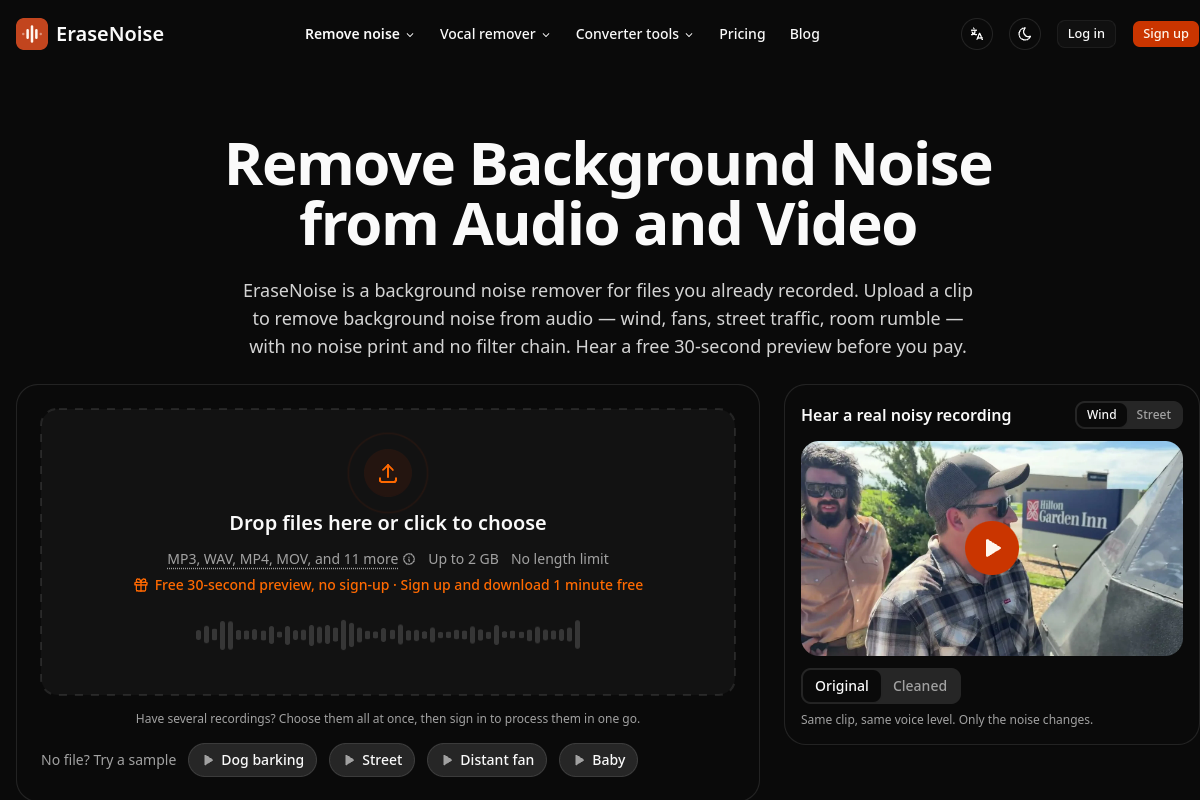
VerifiedEraseNoise is a browser-based tool that removes steady background noise, such as fan hum, air conditioning, wind, and traffic noise, from the speech in audio and video files. It is built for YouTubers, podcasters, course creators, teams, students, journalists, and video editors who need cleaner voice recordings without learning professional audio editing software. Users upload a file (MP3, WAV, MP4, MOV, and more, up to 2GB), hear a free roughly 30-second before-and-after preview, adjust noise reduction strength to keep natural room tone, then download a cleaned file. For video, only the soundtrack is replaced; the picture stays untouched, and a WAV export can be dropped directly onto an editing timeline.
EraseNoise at a glance
- What it is
- EraseNoise is a browser-based tool that removes steady background noise, such as fan hum, air conditioning, wind, and traffic noise, from the speech in audio and video files.
- Who it's for
- Most useful for anyone who needs results in the Voice & Speech AI area without a specialist on staff.
- Primary use case
- EraseNoise removes steady background noise — fans, air conditioning, and electrical hum — from speech in audio and video, right in the browser.
- CategoryVoice & Speech AI
- PricingFree Tier
- Starting price$9.99/month
- Credit cardNo credit card required
- Bring your own keyNot supported
- RatingNo reviews yet. Be the first to rate.
Video Spot
Overview
EraseNoise is a browser-based tool that removes steady background noise, such as fan hum, air conditioning, wind, and traffic noise, from the speech in audio and video files. It is built for YouTubers, podcasters, course creators, teams, students, journalists, and video editors who need cleaner voice recordings without learning professional audio editing software. Users upload a file (MP3, WAV, MP4, MOV, and more, up to 2GB), hear a free roughly 30-second before-and-after preview, adjust noise reduction strength to keep natural room tone, then download a cleaned file. For video, only the soundtrack is replaced; the picture stays untouched, and a WAV export can be dropped directly onto an editing timeline.
EraseNoise removes steady background noise — fans, air conditioning, and electrical hum — from speech in audio and video, right in the browser. Upload common formats, listen to a free roughly 30-second before-and-after preview, then download a cleaned WAV or MP4. It is freemium; Pro is about $9.99 USD per month.
In detail
EraseNoise is an online noise remover that works directly in the browser. It targets steady background sounds sitting underneath speech, such as fan and air conditioning hum, wind gusts, traffic, and room rumble, and lowers them while keeping the speaker's voice intact. Users upload an audio or video file up to 2GB in common formats like MP3, WAV, MP4, and MOV, and the tool processes the clip without requiring any software installation.
The tool is aimed at people who record audio or video but don't want to learn desktop editing software: YouTubers and short-form creators shooting on phones, podcasters dealing with remote guests in echoey rooms, course creators cleaning up screen recordings, teams processing meeting or training recordings, students and journalists transcribing interviews or lectures, and editors wanting a first pass before opening a DAW.
The process is simple: upload the file, listen to a free roughly 30-second before-and-after preview of your own clip (3 previews a day without an account, 20 with one), adjust the noise reduction strength to balance cleanup against natural room tone, and download the result. For video files, EraseNoise replaces only the soundtrack; the original picture is copied as-is without re-encoding, so there is no quality loss or second render. A 48kHz WAV export matching the clip's length is also available to drop straight onto an editing timeline in tools like Premiere, DaVinci Resolve, or CapCut.
What differentiates EraseNoise from a typical desktop workflow is that it skips the usual export-clean-resync-render loop for video, working on the video file directly instead. It also lets users hear a preview of their own file before paying, rather than committing blind. On a set of 24 real recordings from the Microsoft DNS Challenge, EraseNoise reported the background noise score rising from 2.45 to 4.13 out of 5 and overall quality from 2.14 to 3.18.
EraseNoise is freemium. The free plan includes previews, 1 free minute on signup, unlimited silence removal, and files are deleted after 24 hours. Paid options include a Pro monthly plan with 20 hours of processing for audio and video, plus pay-by-the-minute packs that never expire, suited to occasional or seasonal use.
Common uses
- Cleaning up phone or camera footage shot outdoors in wind or on busy streets
- Removing fan or air conditioning hum from home office or bedroom recordings
- Cleaning podcast interviews recorded remotely in echoey rooms while keeping natural room tone
- Preparing course or lesson screen recordings by removing fan/AC hum behind narration
- Cleaning team meeting or training video recordings from Zoom or Teams
- Getting a quick first-pass cleanup on rough footage before deeper editing
Pros
- Works entirely in the browser with no software to install
- Free preview lets users hear results on their own file before paying
- Preserves video quality by not re-encoding the picture when cleaning audio tracks
- Lets users control noise reduction strength to avoid an unnatural, hollow sound
- Minute packs purchased do not expire, useful for irregular workloads
Cons
- Free plan limits previews per day and deletes files after 24 hours
- Several features like batch processing, multitrack cleaning, and transcripts are listed as coming soon, not yet available
- Pro plan and minute packs are required for longer or more frequent processing
- Focused specifically on steady background noise, not stated to handle more complex or variable noise types
Generated from the listing's details and not yet checked by a Zoipi editor.
Key Features
- Browser-based noise removal: no software installation, works on audio and video files up to 2GB
- Free before-and-after preview: roughly 30 seconds of your own file, original versus cleaned
- Video soundtrack-only replacement: picture is copied without re-encoding, avoiding quality loss
- Adjustable noise reduction strength: keep some natural room tone instead of a fully scrubbed sound
- WAV export for editing: 48kHz WAV matching clip length, ready to drop onto a timeline
- Free silence remover: trims long pauses, runs entirely in the browser
- Pay-by-the-minute packs: purchased minutes never expire
- Automatic file deletion: files removed 24 hours after upload
Best For
- People who spend real hours each week on voice & speech ai
- Anyone testing the space without an upfront budget
Pricing Model
Free Tier. Generous ongoing free tier you can start with, no credit card needed. Paid plans unlock higher limits.
Pricing Breakdown
Screenshots
Live preview of EraseNoise's website.
Frequently asked questions
Community Reviews & Discussion
0 reviews · replies are moderated before they appear.
- No reviews yet — be the first to review EraseNoise.