
AI Image Editor
VerifiedAI Image Editor is an online workspace for generating and editing images and short video clips using AI. Users can type a prompt to create new images, upload photos to edit them with text instructions, remove backgrounds, upscale drafts, and turn still images into short video clips. The platform supports many different image and video model families, and offers dedicated tools for product photos, thumbnails, posters, and social media assets. It shows the model and credit cost before generation, and lets users iterate on prompts, aspect ratios, and reference images. It is aimed at creators, marketers, and ecommerce teams who need multiple format versions and review-ready visuals for different channels.
AI Image Editor at a glance
- What it is
- AI Image Editor is an online workspace for generating and editing images and short video clips using AI.
- Who it's for
- Worth a look if projects involving AI Image & Art come up often in your week.
- Primary use case
- AI Image Editor helps users generate images and videos, edit uploads, apply effects, remove backgrounds, upscale assets, and prepare polished visual content in one workspace.
- CategoryAI Image & Art
- PricingFree Tier
- Starting price$16.66/month
- Credit cardNo credit card required
- Bring your own keyNot supported
- RatingNo reviews yet. Be the first to rate.
Video Spot
Overview
AI Image Editor is an online workspace for generating and editing images and short video clips using AI. Users can type a prompt to create new images, upload photos to edit them with text instructions, remove backgrounds, upscale drafts, and turn still images into short video clips. The platform supports many different image and video model families, and offers dedicated tools for product photos, thumbnails, posters, and social media assets. It shows the model and credit cost before generation, and lets users iterate on prompts, aspect ratios, and reference images. It is aimed at creators, marketers, and ecommerce teams who need multiple format versions and review-ready visuals for different channels.
AI Image Editor helps users generate images and videos, edit uploads, apply effects, remove backgrounds, upscale assets, and prepare polished visual content in one workspace.
In detail
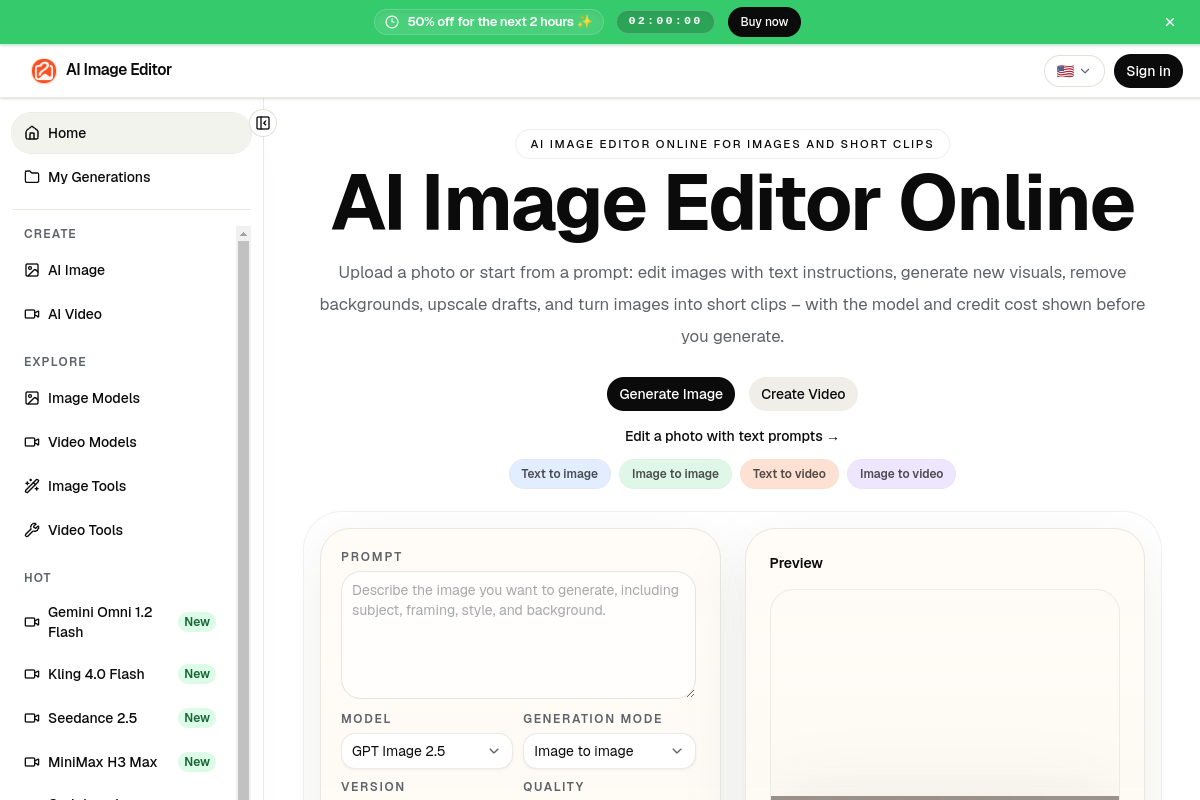
AI Image Editor is a browser-based tool for creating and editing images and short video clips with AI. It combines text-to-image generation, image-to-image editing, background removal, upscaling, and image-to-video conversion in one workspace, with the model and credit cost shown before each generation.
The tool is built for creators, marketers, and ecommerce teams who need to produce multiple visual assets for different channels, such as product photos, YouTube thumbnails, posters, ads, and social media posts. Rather than starting from a blank prompt box, users pick the specific task they need, such as an image tool, video tool, or model page, and work from there.
It works by letting users either start from a text prompt or upload a reference image, then choose a model, generation mode (text to image, image to image, text to video, or image to video), aspect ratio, and resolution. Multiple image and video model families are available, including options described on the site such as GPT Image, Nano Banana, Seedream, Qwen Image, Midjourney, Kling, MiniMax, and Grok Imagine variants, each with its own credit cost. Users can keep iterating by changing the prompt, reference image, ratio, or model, and can continue refining a result after the first generation by removing backgrounds, upscaling, or restyling.
What sets it apart, based on the site's own description, is its organization around specific creative tasks rather than a single generic prompt box: dedicated pages exist for product photos, lifestyle shots, white-background catalog images, thumbnails, posters, and ad images, each with guidance on preparing a source image and inspecting the result before publishing. The product photo tool, for example, stresses that results should be checked against the original image for label accuracy, color, and proportions, since exact preservation of text and logos is not guaranteed.
Overall, AI Image Editor positions itself as a production tool for turning a creative brief into a reviewable draft quickly, then refining that draft through further edits, rather than a single one-shot image generator.
Common uses
- Creating product photos with clean catalog or lifestyle backgrounds from an existing packshot image
- Generating YouTube thumbnails, posters, and social media assets from a text prompt
- Turning a still product or portrait image into a short video clip
- Producing multiple aspect ratio versions of the same visual for different publishing channels
- Iterating on a creative concept by testing several prompts and models before committing to a final design
- Cleaning up or upscaling existing images before publishing
Pros
- Combines image generation, editing, background removal, upscaling, and video creation in one workspace
- Offers access to many different image and video model families in one place
- Shows credit cost per generation before the user commits
- Task-specific tools guide users toward the right workflow instead of a generic prompt box
- Supports iterating with reference images, prompts, aspect ratios, and models
Cons
- Does not guarantee exact preservation of label text, logos, or fine product details during edits, so results need manual inspection
- Subscription credits reset monthly and do not roll over, which may limit flexibility for uneven workloads
- No stated free plan; listed pricing is based on monthly or yearly subscriptions and credit packs
- White-background or compliance-style prompts are not confirmed to meet marketplace requirements automatically
Generated from the listing's details and not yet checked by a Zoipi editor.
Key Features
- Text-to-image and image-to-image generation: create new visuals from prompts or edit uploaded photos with text instructions
- Multiple model families: choose from various image and video models, each shown with its credit cost before generating
- Background removal and upscaling: clean up and enhance drafts as part of a post-generation workflow
- Image-to-video conversion: turn still images or prompts into short video clips
- Task-specific tools: dedicated pages for product photos, YouTube thumbnails, posters, social media posts, and ad images
- Reference image support: upload up to 16 source files to guide edits and preserve subject identity
- Multiple format output: generate square, portrait, landscape, and other aspect ratio versions for different channels
Best For
- People who spend real hours each week on ai image & art
- Anyone testing the space without an upfront budget
Pricing Model
Free Tier. Generous ongoing free tier you can start with, no credit card needed. Paid plans unlock higher limits.
Pricing Breakdown
Screenshots
Live preview of AI Image Editor's website.
Frequently asked questions
Community Reviews & Discussion
0 reviews · replies are moderated before they appear.
- No reviews yet — be the first to review AI Image Editor.